Hi-SPECS INNOVATIVE SOLUTIONS LTD
TP-Link M7200 Price in Kenya
TP-Link M7200 Price in Kenya
Couldn't load pickup availability
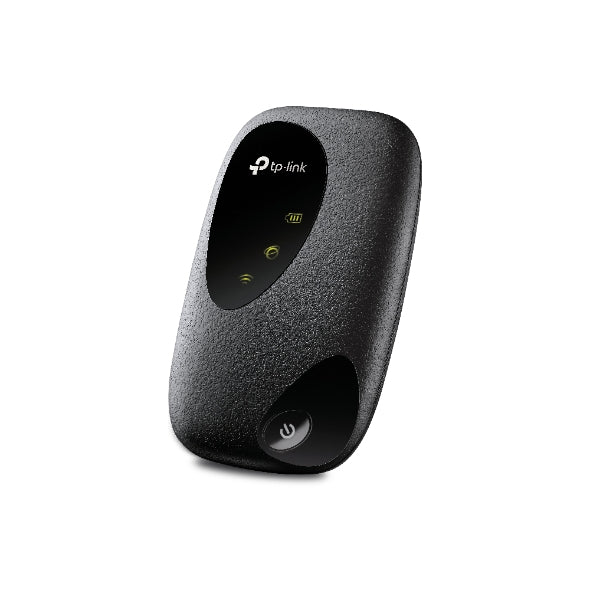
The TP-Link M7200 is a 4G LTE Mobile Wi-Fi (MiFi) router that turns a standard SIM card into a personal Wi-Fi hotspot. It supports download speeds of up to 150 Mbps, connects up to 10 devices simultaneously, and runs for up to 8 hours on its built-in 2000 mAh battery. It is compatible with 4G FDD/TDD-LTE and 3G DC-HSPA+ networks, making it functional across most Kenyan mobile networks and regions worldwide.
TP-Link M7200 Detailed technical specifications
TP-Link M7200 wireless standards & speed specs
|
Specification |
Details |
|
Wireless Standards |
IEEE 802.11b/g/n |
|
Wireless Speeds |
Up to 300 Mbps (Wi-Fi) |
|
Frequency Band |
2.4 GHz |
|
4G Download Speed |
Up to 150 Mbps |
|
4G Upload Speed |
Up to 50 Mbps |
|
4G Network Types |
FDD-LTE B1/B3/B7/B8/B20 (2100/1800/2600/900/800 MHz); TDD-LTE B38/B40/B41 (2600/2300/2500 MHz) |
|
3G Network Types |
DC-HSPA+/HSPA+/HSPA/UMTS B1/B8 (2100/900 MHz) |
TP-Link M7200 advanced wireless technologies specs
|
Specification |
Details |
|
Wireless Security |
WPA-PSK / WPA2-PSK |
|
MAC Filtering |
Wireless MAC Filtering supported |
|
DHCP |
DHCP Server + DHCP Client List |
|
Transmission Power |
2.4 GHz: < 20 dBm |
|
Max Connected Devices |
10 wireless devices simultaneously |
|
App Management |
tpMiFi App (iOS & Android) |
TP-Link M7200 hardware & processing specs
|
Specification |
Details |
|
Battery Capacity |
2000 mAh (Rechargeable) |
|
Battery Model |
TBL-71B2000 / TBL-71A2000 |
|
Battery Life |
Up to 8 hours |
|
Antenna |
Internal Antenna |
|
LED Indicators |
Wi-Fi status, Internet connection status, Battery status |
|
Setup Time |
Operational within 30 seconds of SIM insertion |
TP-Link M7200 physical ports & connectivity specs
|
Specification |
Details |
|
Dimensions (W × D × H) |
94 × 56.7 × 19.8 mm (3.7 × 2.2 × 0.8 in.) |
|
Interface |
1 × Micro USB port (power supply) |
|
SIM Card Slot |
1 × SIM card slot |
|
Button |
Power On/Off |
|
RNDIS Support |
Yes (Windows XP/7/8/10) |
TP-Link M7200 software & security features specs
|
Specification |
Details |
|
Security Protocols |
WPA-PSK / WPA2-PSK |
|
Device Access Control |
Wireless MAC Filtering |
|
Data Limit Management |
Via tpMiFi App |
|
System Requirements |
Windows 10/8/7/Vista/XP, Mac OS, Android, iOS, Windows Phone |
|
Certifications |
CE, RoHS |
|
RNDIS (USB Tethering) |
Yes |
TP-Link M7200 Technical Specifications Simplified
What 4G LTE with 150 Mbps actually means for you
4G LTE is the same mobile internet standard used by Safaricom, Airtel, and Telkom Kenya on their high-speed networks. The TP-Link M7200 is built to tap directly into these 4G signals via a standard SIM card. A download speed ceiling of 150 Mbps means you can stream HD video, join a Zoom call, and upload documents without the buffering that plagues slow connections. In plain terms: if your carrier has 4G coverage where you are, the M7200 will give you fast, reliable internet.

What "connects up to 10 devices" really looks like in practice
Imagine you and four colleagues are working from a shared space in Westlands — each person with a laptop and a phone. That is already 10 devices. The TP-Link M7200 handles all of them from a single SIM card connection, eliminating the need for multiple data bundles or personal hotspots. It is also ideal for small group meetings, study sessions, or family road trips.
What the 2000 mAh battery means for your day
Eight hours of battery life means the TP-Link M7200 can carry you through a full working day on a single charge. Whether you are on a long bus journey from Nairobi to Nakuru or spending a day working outdoors at Karura Forest, the device will not die on you mid-task. When you do need to recharge, the Micro USB port means you can top it up from any standard phone charger or power bank.
What SIM card setup means in seconds, not hours
Unlike fixed internet contracts that require a technician visit or lengthy registration processes, the TP-Link M7200 is live in under 30 seconds. Insert any compatible SIM card from Safaricom, Airtel Kenya, or Telkom Kenya, press the power button, and your Wi-Fi network appears on every nearby device immediately. No configuration wizard. No complicated settings.
What the tpMiFi App adds to your control
The tpMiFi App, available on both Android and iOS, gives you a control panel for your hotspot right on your phone. You can set data usage limits so you do not accidentally exhaust a bundle, restrict specific devices from accessing your network, and monitor who is connected at any given time. It is the kind of control that was previously only available on enterprise routers, packaged into a free mobile app.
Why the TP-Link M7200 is a must-have
1. True mobility — internet that goes where you go
Fixed broadband and home fibre are great until you leave the building. The TP-Link M7200 completely removes the location constraint from internet access. Whether you are at a client meeting in Upper Hill, shooting content along the Nairobi expressway, or presenting at a conference in Eldoret, your personal Wi-Fi network travels with you. This is the emotional shift from "I can only work at my desk" to "I can work from anywhere."
2. One device, up to 10 connections — no more fighting over data
Most smartphone hotspots are designed for personal use. The TP-Link M7200 is engineered to serve an entire group. For small business owners, teachers, or team leaders who need to get colleagues online quickly without everyone burning through their personal data plans, this device eliminates data-sharing friction entirely. It transforms a single SIM card subscription into a shared resource that a whole team can rely on.
3. Fast setup, zero technical headaches
Technology that requires a manual defeats its own purpose. The TP-Link M7200 is designed so that anyone, regardless of technical skill level, can have a working Wi-Fi network in under a minute. The LED display tells you at a glance whether you have Wi-Fi, internet connectivity, and how much battery you have left. There is no learning curve — just insert, press, and connect.
Who is this product for?
The remote worker and digital freelancer
Kenya's gig economy is growing rapidly, with thousands of graphic designers, developers, writers, and consultants working from coworking spaces in Kilimani, client offices, or even open-air spaces across the country. For this group, reliable internet is not optional — it is income. The TP-Link M7200 gives them a dedicated, password-protected Wi-Fi network that does not depend on unreliable public hotspots or café Wi-Fi with inconsistent speeds. It is a professional-grade solution that fits in a shirt pocket.
The student and campus user
University students across institutions like the University of Nairobi, Strathmore, and JKUAT frequently need internet access for research, online exams, and collaborative projects in areas where campus Wi-Fi is congested or limited. The TP-Link M7200 provides a private, fast connection that can be shared among a study group of up to 10 people. A single monthly data bundle split across multiple users makes it a highly cost-effective solution for students on a budget.
The traveller and field professional
Field sales executives, journalists, NGO workers, and road warriors who frequently move between towns or counties need internet that does not require them to hunt for a hotspot. The TP-Link M7200 is compatible with 4G networks across most of Kenya's counties and supports 3G as a fallback, meaning connectivity is maintained even in areas with partial coverage. With eight hours of battery life, it survives a full day of fieldwork without needing a power source.
TP-Link M7200 Real-world performance and expert insights
How the TP-Link M7200 performs in real conditions
In real-world use, the TP-Link M7200 consistently delivers on its core promise: fast, portable, shareable internet. The device locks on to 4G LTE signals quickly, and the LED indicators make it easy to confirm network status without opening an app. The tpMiFi App's data limit feature is particularly useful in the Kenyan context, where mobile data is purchased in fixed bundles — being able to set a cap prevents unexpected bundle depletion when multiple users are connected.
The device's compact dimensions of 94 × 56.7 × 19.8 mm mean it is genuinely pocketable. It does not add noticeable weight to a laptop bag or backpack, which matters for users who are already carrying equipment.
Where the TP-Link M7200 stands out from cheaper alternatives is in its dual-mode 4G/3G support. In areas of Nairobi CBD or urban centres where 4G congestion can occur at peak hours, the ability to fall back to 3G DC-HSPA+ maintains usable connectivity rather than dropping the connection entirely. This resilience is what separates a device built for professional use from a basic hotspot.
The WPA2-PSK security standard ensures that your connection is encrypted and protected, which is critical when working with sensitive business or personal data over a mobile network.
TP-Link M7200 Frequently asked questions
Will the TP-Link M7200 work with a Safaricom or Airtel Kenya SIM card?
Yes. The TP-Link M7200 supports 4G FDD-LTE bands B1, B3, B7, B8, and B20, as well as TDD-LTE bands B38, B40, and B41. Both Safaricom and Airtel Kenya deploy their 4G LTE networks on several of these bands, most commonly Band 3 (1800 MHz) and Band 1 (2100 MHz). This makes the M7200 natively compatible with Kenya's two largest mobile networks. You should confirm your SIM's band support with your carrier, but in the vast majority of urban and peri-urban locations in Kenya, the device will work seamlessly on 4G.
How many people can realistically use the TP-Link M7200 at the same time?
The TP-Link M7200 supports up to 10 simultaneous wireless connections. In practical terms, performance will depend on the total bandwidth being used across those devices and the strength of your 4G signal at that location. For activities like web browsing, messaging, and document work, 10 users can be comfortably supported. For data-intensive tasks like HD video streaming across multiple devices, you may notice slower speeds as the available bandwidth is divided. The tpMiFi App allows you to control which devices are connected, so you can prioritise the connections that matter most.
Is the TP-Link M7200 worth buying if I already have a smartphone hotspot?
Yes, for several reasons. Your smartphone's hotspot function drains its battery very quickly, often making it impractical to use for extended periods without plugging in. The TP-Link M7200 has a dedicated 2000 mAh battery built specifically for hotspot use, rated for up to 8 hours of operation. It also supports up to 10 devices simultaneously, compared to the 5–8 device limits common on most smartphones. Additionally, using a dedicated MiFi device keeps your smartphone's battery available for calls, navigation, and other tasks. For anyone who uses mobile data for work regularly, the M7200 pays for itself in convenience quickly.
Does the TP-Link M7200 work without the tpMiFi App?
Yes. The tpMiFi App is optional, not required. Once you insert a SIM card and power on the device, it creates a Wi-Fi network automatically. The network name (SSID) and password are typically printed on the device or included in the packaging. The tpMiFi App simply enhances the experience by giving you access to advanced controls like data limits, device whitelisting, and connection monitoring from your smartphone. The core function — providing a 4G Wi-Fi hotspot — works entirely independently of the app.
How do I charge the TP-Link M7200, and can I use it while charging?
The TP-Link M7200 charges via its Micro USB port, the same connection type used by many older Android phones and accessories. This means you can charge it using any standard Micro USB cable and adapter, including a power bank, which is especially useful for extended use outdoors or during travel. The device can generally be used while charging, meaning you can extend its operational time indefinitely when a power source is available, effectively turning it into a full-time portable router rather than just an 8-hour device.