Hi-SPECS INNOVATIVE SOLUTIONS LTD
Logitech M171 Wireless Mouse Price in Kenya
Logitech M171 Wireless Mouse Price in Kenya
Couldn't load pickup availability
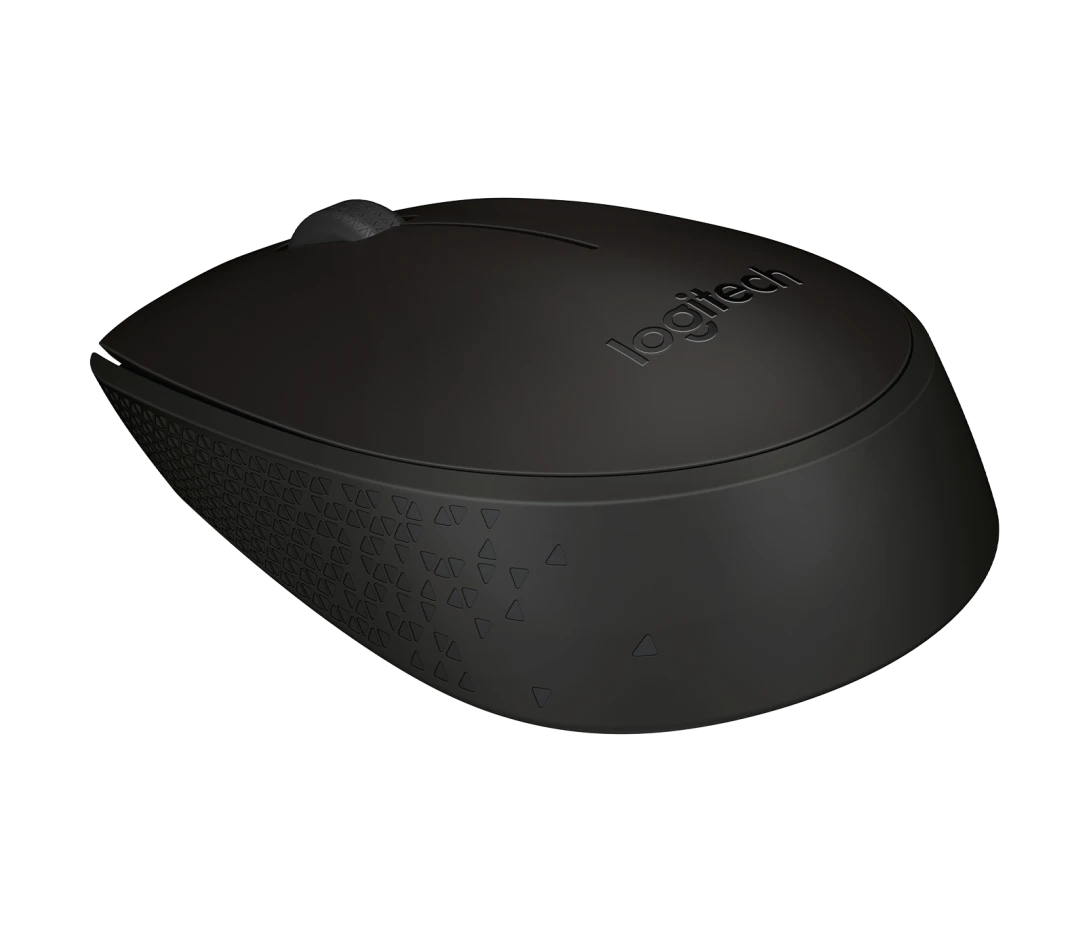
The Logitech M171 wireless mouse is a compact, ambidextrous optical mouse designed for everyday use on Windows, macOS, Chrome OS, and Linux. It connects via a 2.4 GHz USB receiver, offers up to 10 metres of wireless range, and runs for up to 12 months on a single AA battery. It features an optical sensor for smooth cursor tracking on almost any surface, line-by-line scroll control, and a power-saving auto-sleep mode. It is one of the most straightforward plug-and-play mice available, making it ideal for students, office workers, and anyone who needs reliable wireless navigation without any setup complexity.
Logitech M171 Wireless Mouse Detailed technical specifications
Logitech M171 wireless mouse connectivity & power specs
|
Specification |
Details |
|
Wireless Technology |
2.4 GHz wireless |
|
USB Receiver |
Nano USB receiver (plug & play) |
|
Setup Time |
Connects in approximately 3 seconds |
|
Wireless Range |
Up to 10 metres |
|
Battery Type |
1 × AA battery |
|
Battery Life |
Up to 12 months |
|
Power-saving Feature |
On/off switch + auto-sleep mode |
|
Compatible OS |
Windows, macOS, Chrome OS, Linux |
Logitech M171 wireless mouse sensor & tracking performance specs
|
Specification |
Details |
|
Sensor Type |
Optical tracking |
|
Scrolling |
Line-by-line controlled scrolling |
|
Cursor Control |
Smooth and accurate on almost any surface |
|
Tracking Reliability |
Consistent with no missed clicks |
|
Surface Compatibility |
Works on most common surfaces |
Logitech M171 wireless mouse ergonomics & design specs
|
Specification |
Details |
|
Form Factor |
Compact and portable |
|
Hand Orientation |
Fully ambidextrous (left- or right-handed) |
|
Portability |
Fits in a laptop bag |
|
Comfort Claim |
More ergonomic than a built-in touchpad* |
|
Grip Style |
Full-hand compact grip |
*Based on a Logitech Ergonomic Lab study with 23 participants (October 2019), comparing standard mice against built-in trackpads.
Logitech M171 wireless mouse build & customisation specs
|
Specification |
Details |
|
Number of Buttons |
Left click, right click, scroll wheel |
|
Scroll Wheel |
Yes — line-by-line scrolling |
|
On/Off Switch |
Yes — physical power button |
|
Software Required |
None (plug & play) |
|
Customisation Software |
Compatible with Logi Options+ (optional) |
Logitech M171 wireless mouse build quality & materials specs
|
Specification |
Details |
|
Build Standard |
Same quality standard as Logitech's full product range |
|
Recycled Plastic |
Made with recycled plastic components |
|
Sustainability |
Designed with reduced carbon footprint in mind |
|
Carbon Footprint |
4.05 kg CO2e (product lifecycle) |
|
Durability Rating |
Built for daily long-term use |
|
Certifications |
Meets Logitech sustainability criteria |
Logitech M171 Wireless Mouse Technical Specs Simplified
What 2.4 GHz wireless with a nano USB receiver means for you
The Logitech M171 wireless mouse uses a tiny USB plug — about the size of a thumbnail — that you insert into any USB-A port on your laptop or desktop. Once it is in, the mouse is live in about three seconds. There is no pairing process, no app to download, and no Bluetooth settings to navigate. You can even leave the nano receiver plugged into your laptop permanently without worrying about breaking it. The 2.4 GHz connection is also interference-resistant, meaning it will not drop out or lag when you are working near other wireless devices.

What a 10-metre wireless range actually gives you
Most people sit within two or three metres of their screen, so 10 metres of range is genuinely generous. It means you can move around your workspace, step slightly back from a presentation screen, or work from a relaxed position on a couch without losing connectivity. In practical terms, the range is rarely a limitation — the connection simply stays consistent wherever you place the mouse on your desk.
What 12 months of battery life changes about your routine
The logitech m171 wireless mouse runs for up to a full year on a single AA battery. In Kenya, where buying batteries is as easy as stopping at any duka or supermarket in Nairobi, Mombasa, or Kisumu, this is very convenient. You do not need to keep a spare battery kit or charge the mouse overnight. The auto-sleep mode kicks in when the mouse is idle, and the physical on/off switch lets you cut power entirely when packing the mouse into a bag — extending battery life even further.
What ambidextrous design means in practice
Most mice are shaped for right-handed users, which creates daily discomfort for left-handed people. The Logitech M171 wireless mouse has a symmetrical shape that works the same way regardless of which hand you use. Both left click and right click buttons are positioned evenly on either side. For left-handed students, teachers, or office workers who are tired of using a right-biased mouse, this is a genuinely useful design decision.
What optical tracking on any surface means
The optical sensor in the Logitech M171 wireless mouse reads movement by capturing thousands of images per second of the surface beneath it. The result is smooth, accurate cursor movement that does not require a special mouse pad. It works on wooden desks, fabric surfaces, laminate tables, and even moderately textured surfaces. The line-by-line scrolling adds precise control when reading documents or browsing web pages — you scroll exactly as much as you intend to.
Why the Logitech M171 Wireless Mouse is a must have
1. Zero-setup connectivity — you are productive in seconds
The biggest hidden cost of technology is lost time. Setting up complicated devices, troubleshooting drivers, or waiting for software to install all eat into your day. The Logitech M171 wireless mouse removes all of that. You plug in the USB receiver, and it works — on Windows, macOS, Chrome OS, and Linux. For a student in Eldoret who just needs to get started on their assignment, or an office administrator in Nairobi who unpacks their laptop for a morning meeting, this kind of immediate reliability is genuinely valuable.
2. A full year of battery life — one less thing to worry about
Battery anxiety is a real concern with wireless devices. The Logitech M171 wireless mouse solves this by offering up to 12 months of use on a single AA battery, supported by auto-sleep mode and a physical on/off switch. This means you buy the mouse, replace the battery roughly once a year, and never have to think about it in between. For users in Kenya who frequently deal with load shedding or limited access to charging points during travel or fieldwork, having a mouse that is not dependent on daily charging is a practical advantage.
3. Works for every hand — no one is left out
The fully ambidextrous design of the Logitech M171 wireless mouse is not just a design detail — it is a functional commitment to inclusivity. Whether you are left-handed or right-handed, the mouse feels balanced and natural to use. Combined with its compact size, which fits easily into any laptop bag or school backpack, this is a device that genuinely adapts to the user rather than the other way around.
Who is this product for?
The student and campus user
For secondary school and university students across Nairobi, Mombasa, and Kisumu — from USIU-Africa to Kenyatta University — working long hours on a laptop's built-in touchpad is a real ergonomic and productivity challenge. Research from Logitech's own ergonomic lab confirms that using a mouse is more comfortable than a touchpad for extended work sessions. The Logitech M171 wireless mouse solves this by providing accurate, comfortable navigation at an accessible price point. The 12-month battery means students are not buying batteries every few weeks, and the plug-and-play setup means no IT help is needed in halls of residence or lecture halls.
The home office professional and remote worker
Kenya's remote work culture has grown significantly, with professionals working from home setups in estates across Nairobi — from Kileleshwa to Ruiru. For someone who splits their day across video calls, spreadsheets, and document editing, a reliable wireless mouse is a daily productivity tool. The Logitech M171 wireless mouse provides a consistent, no-lag connection via 2.4 GHz wireless, optical tracking that works on a home desk without a mouse pad, and a compact form that does not clutter a small workspace. The long battery life removes one more maintenance task from an already busy schedule.
The casual and first-time computer user
Not every buyer is a power user or tech enthusiast. Many Kenyans purchasing their first laptop — perhaps from one of the many electronics shops along Luthuli Avenue in Nairobi — need a mouse that is simple to understand and use. The Logitech M171 wireless mouse is that product. Insert the USB receiver, press the power button, and it works. There is no manual to read, no app to install, and no settings to configure. The LED indicators on the packaging clearly communicate the basic workflow, and the mouse itself requires no learning curve whatsoever.
Trusted, tested, and built to last: Real-world performance of the Logitech M171 wireless mouse
Logitech has been designing mice for over 25 years, and the M171 reflects the accumulated engineering knowledge of that experience. It is not a device built to impress on a spec sheet — it is built to perform reliably day after day in ordinary conditions. The optical sensor tracks accurately on the kind of surfaces found in real working environments: textured desks, fabric placemats, and wooden tables. Users do not need to carry a mouse pad to get consistent performance.
The auto-sleep mode is a well-implemented feature that activates when the mouse has been idle, then wakes instantly the moment you move it again. This behaviour is smooth and unnoticeable in practice — there is no frustrating delay when you return to your computer mid-task. The physical on/off switch is a useful addition for anyone who travels with the device regularly, as it prevents the mouse from accidentally waking and draining the battery inside a bag.
From a durability standpoint, the M171 is constructed to withstand the demands of daily use. The button mechanisms feel solid and consistent, and the scroll wheel provides tactile line-by-line resistance that does not feel flimsy. Logitech has held the global number one position in mice and keyboard sales for many years based on independent retail data, and the M171 is a direct reflection of why that reputation is well-earned. It does not cut corners on the fundamentals — reliable connection, accurate tracking, and a long battery life — which are the only three things that truly matter in an everyday mouse.
Logitech M171 Wireless Mouse Frequently asked questions
Does the Logitech M171 wireless mouse require any software to work?
No. The Logitech M171 wireless mouse is entirely plug-and-play. All you need to do is insert the nano USB receiver into a free USB-A port on your laptop or desktop, and the mouse will be operational within approximately three seconds. There is no driver installation required, no software to download, and no account to create. It is recognised automatically by Windows, macOS, Chrome OS, and Linux. If you choose to customise button behaviour or adjust settings at a later stage, the optional Logi Options+ software is available for free download, but it is not required for the mouse to function out of the box.
How long does the battery in the Logitech M171 wireless mouse last, and what type does it use?
The Logitech M171 wireless mouse uses a single AA battery, which is the most widely available battery format in Kenya — found in virtually every supermarket, convenience store, and electronics shop across the country. Under normal use conditions, the battery lasts up to 12 months before needing replacement. This extended lifespan is achieved through a combination of an auto-sleep mode that activates during periods of inactivity and a physical on/off switch that allows you to cut power entirely when the mouse is not in use, such as during commutes or storage in a bag.
Is the Logitech M171 wireless mouse compatible with a MacBook or Chromebook?
Yes. The Logitech M171 wireless mouse is compatible with Windows, macOS, Chrome OS, and Linux. This makes it a versatile choice for users who work across different devices or operating systems. Compatibility with Chrome OS is particularly relevant for students using Chromebook devices, which have become increasingly common in educational settings in Kenya. The nano USB receiver connection is universal and does not require any OS-specific configuration — the mouse works the same way regardless of which compatible platform it is plugged into.
What is the logitech m171 usb receiver, and can I replace it if it is lost?
The Logitech M171 USB receiver is a small nano-sized USB dongle that enables the 2.4 GHz wireless connection between the mouse and your computer. It is compact enough to be left permanently plugged into a laptop port without protruding significantly. If the original USB receiver is lost, Logitech offers replacement receivers through its support channels. However, the M171's receiver is model-specific and is not part of Logitech's Unifying receiver system, so it is worth keeping the original receiver stored safely — ideally in the battery compartment of the mouse itself when not in use, which is a common practice for safe storage.
Is the Logitech M171 wireless mouse worth buying compared to using a laptop's built-in touchpad?
Yes, and this is backed by research, not just preference. A Logitech Ergonomic Lab study conducted in October 2019 with 23 participants found that using a standard mouse is more ergonomic than using a built-in touchpad. In practical terms, this means less wrist strain and more precise cursor control during extended work or study sessions. The Logitech M171 wireless mouse also provides tactile scroll control and two distinct click buttons, which are significantly more efficient for tasks like navigating spreadsheets, editing documents, and browsing the web compared to touchpad gestures. For anyone spending more than an hour or two per day on a computer, the upgrade from a touchpad to the M171 is a noticeable and worthwhile improvement in comfort and productivity.