Hi-SPECS INNOVATIVE SOLUTIONS LTD
Lenovo thinkpad X1 Core I7 10th Generation Price in Kenya
Lenovo thinkpad X1 Core I7 10th Generation Price in Kenya
Couldn't load pickup availability
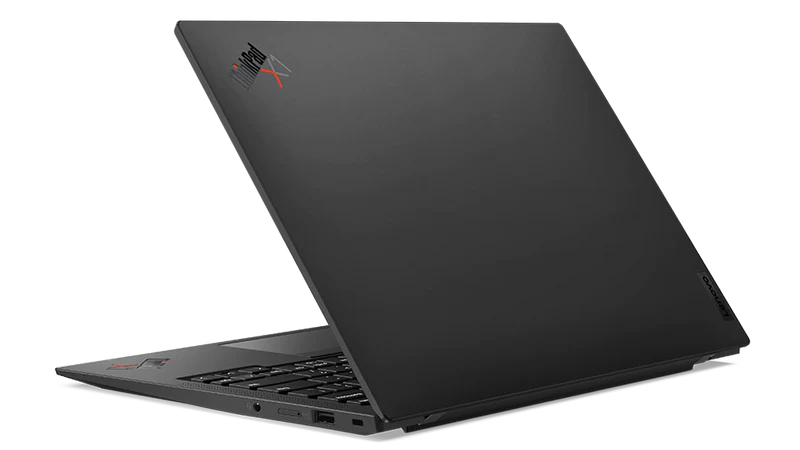
The Lenovo ThinkPad X1 Carbon i7 Gen 10 is a 14-inch premium business ultrabook powered by a 12th Generation Intel Core i7 processor (up to i7-1280P), featuring up to 32GB LPDDR5 RAM, a PCIe Gen 4 NVMe SSD, and Intel Iris Xe Graphics — all in a carbon-fibre chassis weighing just 1.12 kg. It is the definitive choice for professionals who need desktop-grade performance in a travel-ready, ultra-durable machine.
Detailed Technical Specifications
Lenovo ThinkPad X1 Carbon i7 Processor Performance Specs
|
Specification |
Details |
|
Processor Family |
12th Generation Intel® Core™ i7 |
|
i7-1255U Cores / Threads |
10 (2 P-core + 8 E-core) / 12 |
|
i7-1255U Base / Max Frequency |
P-core 1.7GHz / 4.7GHz; E-core 1.2GHz / 3.5GHz |
|
i7-1260P Cores / Threads |
12 (4 P-core + 8 E-core) / 16 |
|
i7-1260P Base / Max Frequency |
P-core 2.1GHz / 4.7GHz; E-core 1.5GHz / 3.4GHz |
|
i7-1265U Cores / Threads |
10 (2 P-core + 8 E-core) / 12 |
|
i7-1265U Base / Max Frequency |
P-core 1.8GHz / 4.8GHz; E-core 1.3GHz / 3.6GHz |
|
i7-1270P Cores / Threads |
12 (4 P-core + 8 E-core) / 16 |
|
i7-1270P Base / Max Frequency |
P-core 2.2GHz / 4.8GHz; E-core 1.6GHz / 3.5GHz |
|
i7-1280P Cores / Threads |
14 (6 P-core + 8 E-core) / 20 |
|
i7-1280P Base / Max Frequency |
P-core 1.8GHz / 4.8GHz; E-core 1.3GHz / 3.6GHz |
|
Cache (i7-1260P / i7-1270P) |
18MB Intel® Smart Cache |
|
Cache (i7-1280P) |
24MB Intel® Smart Cache |
|
Chipset |
Intel® SoC (System on Chip) Platform |
|
Operating System Options |
Windows 11 Pro, Windows 11 Home, Ubuntu Linux, Fedora Linux |
|
Intel vPro® Support |
vPro® Enterprise and vPro® Essentials available |
Lenovo ThinkPad X1 Carbon i7 Memory & Storage Specs
|
Specification |
Details |
|
Memory Type |
LPDDR5-5200 (hardware rated LPDDR5-6400) |
|
Maximum RAM |
32GB |
|
RAM Configuration |
Soldered to system board; not upgradable |
|
RAM Options |
8GB / 16GB / 32GB |
|
Storage Interface |
PCIe® 4.0 x4 NVMe® M.2 2280 slot |
|
Storage Capacity Options |
256GB / 512GB / 1TB / 2TB |
|
Storage Security |
Opal 2.0 encryption support |
|
Card Reader |
None |
Lenovo ThinkPad X1 Carbon i7 Display Specs
|
Display Option |
Resolution |
Type |
Brightness |
Aspect Ratio |
Colour Gamut |
Key Feature |
|
WUXGA (Standard) |
1920 x 1200 |
IPS, Anti-glare |
400 nits |
16:10 |
100% sRGB |
Eyesafe® Certified, Low Power |
|
WUXGA (Touch) |
1920 x 1200 |
IPS, Anti-glare |
400 nits |
16:10 |
100% sRGB |
Eyesafe® Certified |
|
WUXGA (Privacy Touch) |
1920 x 1200 |
IPS, Anti-glare |
500 nits |
16:10 |
100% sRGB |
ThinkPad® Privacy Guard |
|
2.8K OLED |
2880 x 1800 |
OLED, Anti-glare |
400 nits |
16:10 |
100% DCI-P3 |
DisplayHDR™ True Black 500, Dolby Vision® |
|
WQUXGA (4K, Non-touch) |
3840 x 2400 |
IPS |
500 nits |
16:10 |
100% DCI-P3 |
DisplayHDR™ 400, Dolby Vision® |
|
WQUXGA (4K, Touch) |
3840 x 2400 |
IPS, Anti-glare |
500 nits |
16:10 |
100% DCI-P3 |
DisplayHDR™ 400, Dolby Vision® |
|
Viewing Angles (All panels) |
L/R/U/D |
— |
85°/85°/85°/85° |
— |
— |
Wide-angle IPS technology |
|
Touch Support |
Up to 10-point multi-touch |
— |
— |
— |
— |
On-cell or Add-on Film |
Lenovo ThinkPad X1 Carbon i7 Battery & Connectivity Specs
|
Specification |
Details |
|
Battery Capacity |
Integrated Li-Polymer 57Wh |
|
Rapid Charge |
Charges up to 80% in 1 hour (with 65W adapter) |
|
Max Battery Life (MobileMark 2018, i7-1260P config) |
Up to 14.2 hours |
|
Max Battery Life (JEITA 2.0) |
Up to 21.7 hours |
|
Power Adapter Options |
45W or 65W USB-C®, PD 3.0 compatible, 100–240V / 50–60Hz |
|
Wi-Fi Standard |
Intel® Wi-Fi 6 AX201 or Wi-Fi 6E AX211 (802.11ax 2x2) |
|
Bluetooth |
5.1 (5.2 hardware ready) |
|
WWAN Options |
Optional 4G LTE CAT16 (Fibocom L860-GL-16) or 5G Sub-6 GHz (Fibocom FM350-GL) with eSIM |
|
NFC |
Optional |
|
Ethernet |
No onboard Ethernet (supported via optional USB-C® adapter) |
Lenovo ThinkPad X1 Carbon i7 Graphics Capabilities Specs
|
Specification |
Details |
|
GPU Type |
Intel® Iris® Xe Graphics (Integrated) |
|
VRAM |
Shared system memory |
|
DirectX Support |
DirectX® 12.1 |
|
Max External Displays |
Up to 4 independent displays (1 native + 3 external) |
|
Thunderbolt Display Support |
Up to 5K @ 60Hz |
|
HDMI Display Support |
Up to 4K @ 60Hz |
|
Geekbench 5.4 (i7-1260P) |
Single-core: ~1,644 / Multi-core: ~8,159 |
|
Cinebench R23 (i7-1265U) |
Single-thread: ~1,597 / Multi-thread: ~8,197 |
Lenovo ThinkPad X1 Carbon i7 Portability and Build Specs
|
Specification |
Details |
|
Dimensions (W x D x H) |
315.6 x 222.5 x 15.36 mm (12.43 x 8.76 x 0.60 inches) |
|
Starting Weight |
1.12 kg (2.48 lbs) |
|
Case Colour Options |
Deep Black (Paint) / Deep Black (Weave) |
|
Case Materials |
Carbon fibre (top cover), Aluminium (bottom) |
|
Military Durability Standard |
MIL-STD-810H tested |
Lenovo ThinkPad X1 Carbon i7 Build & Essentials Specs
|
Specification |
Details |
|
Keyboard |
6-row, spill-resistant, LED backlit, multimedia Fn keys with Unified Communications controls |
|
Pointing Devices |
TrackPoint® + glass surface multi-touch touchpad (56 x 110 mm) |
|
Camera Options |
FHD 1080p with privacy shutter; optional IR camera for Windows Hello |
|
Microphone |
Quad-microphone array, 360° far-field, Dolby Voice® |
|
Speakers |
Stereo, 2W x2 woofers + 0.8W x2 tweeters, Dolby Atmos® |
|
Fingerprint Reader |
Touch-style, integrated in power button, match-on-chip |
|
Security Chip |
Discrete TPM 2.0, TCG certified, FIPS 140-2 certified |
|
Physical Lock |
Kensington® Nano Security Slot™ (2.5 x 6 mm) |
|
Standard Ports |
2x Thunderbolt 4 / USB4 (40Gbps), 2x USB-A 3.2 Gen 1, 1x HDMI 2.1, 1x 3.5mm audio jack |
|
Certifications |
ENERGY STAR® 8.0, EPEAT™ Gold, TCO Certified 9.0, MIL-STD-810H, RoHS |
|
Sustainability |
95% post-consumer recycled plastic in speaker enclosure and power adapter; 90% recycled packaging |
|
Base Warranty |
1-year courier/carry-in or limited onsite; 3-year options available |
Lenovo thinkpad X1 carbon Features Explained
The i7 Processor — Raw Power You Can Actually Feel
The Lenovo ThinkPad X1 Carbon i7 Gen 10 runs on the 12th Generation Intel Core i7, a processor architecture that splits work between high-power Performance cores and efficient E-cores. What that means for you is simple: heavy tasks like running multiple browser tabs, editing spreadsheets, video conferencing on Zoom or Teams, and compiling reports all happen simultaneously without the machine slowing down or heating up. The top-spec i7-1280P variant offers 14 cores and 20 threads — more firepower than many entry-level workstations.
Up to 32GB Soldered RAM — True Multitasking, Zero Lag
The 32GB LPDDR5 memory configuration means you can run Outlook, Chrome with 20 tabs, a Zoom call, Excel, and a PDF editor all at the same time without hesitation. The memory is soldered directly onto the board, which actually improves reliability — there are no loose RAM sticks to fail or corrode over time, a particularly relevant consideration given Nairobi's variable humidity levels.
PCIe Gen 4 NVMe SSD — Practically Instant Everything
The PCIe 4.0 NVMe SSD delivers file copy speeds of over 1,461 MBps in real-world tests. To put that in perspective, transferring a 5GB presentation or project file takes under four seconds. For professionals working with large datasets, design files, or video recordings, this SSD makes the lenovo thinkpad x1 carbon 10 gen feel more like a speed upgrade than a laptop purchase.
The 14-Inch 16:10 Display — More Screen, Less Scrolling
The taller 16:10 aspect ratio means you see more content vertically compared to a standard 16:9 screen. Reading a legal document, viewing financial models, or working in code editors becomes significantly more comfortable. The premium OLED option hits 100% DCI-P3 colour accuracy with a 100,000:1 contrast ratio — ideal for colour-sensitive creative work or simply enjoying content in stunning detail.
57Wh Battery With Rapid Charge — All-Day Power in Nairobi Traffic
The 57Wh battery with Rapid Charge technology fills up to 80% in just one hour. With a U-series i7 configuration, battery life stretches beyond 14 hours on standard workloads. Whether you're working through a long commute on the Thika Superhighway or attending back-to-back meetings at a co-working space in Karen, this machine keeps up without hunting for a power socket.
MIL-STD-810H Durability — Built for the Real World
MIL-STD-810H is a United States military durability standard. It means the ThinkPad X1 Carbon Gen 10 has been tested against extreme temperature swings, altitude, humidity, shock, vibration, and dust exposure. This is not marketing language — it is a genuine certification that tells you the machine can handle being carried across Nairobi's varied terrains, from humid coastal conditions when you travel to Mombasa, to dusty construction-adjacent environments.
Intel Wi-Fi 6E — Faster Wireless, Fewer Dropouts
Wi-Fi 6E operates on the 6GHz band, which is far less congested than standard 2.4GHz or 5GHz networks. In busy environments like hotels, co-working hubs in Westlands, or conference centres, this translates directly into more stable, faster connections. The optional 5G Sub-6 GHz WWAN module means you can even slip in a Safaricom or Airtel SIM card for direct mobile internet access without a hotspot.
Why the ThinkPad X1 Carbon i7 Is a Must-Have
1. It Outlasts Its Price Tag The lenovo thinkpad x1 carbon gen 10 is engineered to serve professionals for five to seven years of daily use. The carbon-fibre construction, spill-resistant keyboard, MIL-STD-810H certification, and soldered RAM all reduce the failure points that cut cheaper laptops short. Over five years, the total cost of ownership is significantly lower than replacing a budget machine every two to three years — which matters whether you're an individual professional or an IT buyer managing a fleet of devices for a Nairobi-based SME.
2. It Adapts to Every Work Environment With dual Thunderbolt 4 ports, full-size HDMI 2.1, two USB-A ports, optional 4G LTE or 5G WWAN, and optional NFC, the X1 Carbon connects to virtually any setup. Dock it to a triple-monitor workstation at the office, then unplug and work from iHub in Kilimani on battery, then connect directly to a client's conference room projector via HDMI — all without carrying adapters or worrying about compatibility.
3. It Protects Your Work and Your Privacy The discrete TPM 2.0, FIPS 140-2 certified security chip, Kensington lock slot, fingerprint reader integrated into the power button, optional IR camera for Windows Hello facial recognition, physical camera privacy shutter, and Intel vPro® enterprise management all work together to make this one of the most security-hardened consumer-grade business laptops available. For professionals handling confidential client data, financial records, or sensitive communications, this level of protection is not optional — it is essential.
Who Should Buy the Lenovo ThinkPad X1 Carbon i7?
The Nairobi Business Executive
You manage a packed calendar across the CBD, Karen, and Gigiri. You need a machine that opens instantly, stays connected through LTE if the Wi-Fi drops, runs flawlessly through a 10-hour day, and looks professional in every setting. The X1 Carbon i7's sub-1.12 kg weight means it disappears into your bag. The all-day battery means you never apologise for a dead laptop mid-presentation. The premium build communicates competence before you say a word. This is precisely what the lenovo thinkpad x1 carbon price in kenya delivers at its tier.
The Developer or Data Analyst
You spend your day in VS Code, Jupyter Notebooks, or running database queries. The i7-1270P or i7-1280P with 32GB RAM and a 2TB PCIe Gen 4 SSD gives you enough headroom to run Docker containers, local development environments, and virtual machines simultaneously without breaking a sweat. Linux support (Ubuntu and Fedora are officially supported) is an additional bonus for developers who prefer an open-source environment.
The SME Owner or Remote Worker
You need reliability above all else. You cannot afford to have your laptop fail during a client call or a payment processing session. The MIL-STD-810H durability, long-term support warranty options, Intel vPro enterprise management, and Lenovo's global service network — accessible through authorised service partners in Nairobi — make the lenovo thinkpad x1 carbon i7 a business investment, not just a hardware purchase.
Real-World Performance: What the Experts and Users Say About the ThinkPad X1 Carbon Gen 10
The ThinkPad keyboard has earned a near-legendary reputation over two decades of consistent engineering. The 6-row, spill-resistant design with Unified Communications controls means dedicated keys for muting your microphone, adjusting your camera, or answering calls — features that matter enormously in the hybrid work era. Users across professional forums consistently rate it as the best keyboard on any ultrabook currently available.
In independent benchmark testing, the i7-1260P configuration scores around 1,644 in single-core and over 8,100 in multi-core tests on Geekbench 5.4. In file transfer benchmarks, the PCIe Gen 4 SSD moves 25GB of data at over 1,461 MBps — faster than most competing ultrabooks in its class.
The carbon-fibre top cover and aluminium base construction is not just light — it is genuinely rigid. Flex when typing is minimal. The chassis does not creak under pressure. This matters to professionals who pack their laptop daily and need it to survive the rigours of commuting in Nairobi, including the occasional unexpected downpour on Moi Avenue.
Battery life varies by configuration. U-series i7 models (i7-1255U, i7-1265U) are the best choice for maximum endurance, delivering over 14 hours in real-world mixed-use testing. P-series i7 models (i7-1260P, i7-1270P) trade some battery life for significantly higher sustained performance — ideal if your laptop is mostly desk-docked and plugged in.
The 2.8K OLED display option is a genuine standout: 100,000:1 contrast ratio, Dolby Vision® support, and DisplayHDR™ True Black 500 certification produce colours and blacks that IPS panels simply cannot match.
Lenovo ThinkPad X1 Carbon i7 Frequently Asked Questions
Is The Lenovo ThinkPad X1 Carbon i7 Worth Buying in Kenya in 2025?
Yes — particularly for business professionals, consultants, developers, and executives who need a reliable, long-lasting machine. The lenovo thinkpad x1 carbon price in kenya reflects a premium build quality, military-grade durability, Intel vPro security, and a best-in-class keyboard that competing ultrabooks at similar price points struggle to match. When you factor in the five-to-seven-year usable lifespan, the cost per year is significantly lower than cheaper alternatives that require replacement sooner.
Can I Upgrade the RAM or SSD on the ThinkPad X1 Carbon Gen 10?
The RAM is soldered directly to the motherboard and cannot be upgraded after purchase — this is why it is critical to choose the right configuration at the time of buying. The 32GB LPDDR5 option is strongly recommended for users who plan to use the machine for three or more years. The SSD, however, sits in a standard M.2 2280 PCIe 4.0 slot and can be replaced or upgraded by a qualified technician. If you plan to add storage down the line, start with a 512GB or 1TB model for your primary drive.
Does the ThinkPad X1 Carbon Gen 10 Support 4G or 5G in Kenya?
Yes. The lenovo thinkpad x1 carbon 10 gen supports an optional Fibocom FM350-GL 5G Sub-6 GHz module with embedded eSIM functionality, or a Fibocom L860-GL-16 4G LTE CAT16 module. Both are compatible with Kenyan mobile networks including Safaricom and Airtel Kenya. You can insert a Nano-SIM card directly into the optional SIM card slot, allowing you to work from anywhere with mobile data coverage — no mobile hotspot device required.
What Display Should I Choose on the Lenovo ThinkPad X1 Carbon i7?
For most business users, the WUXGA (1920 x 1200) IPS non-touch display is the best balance of battery life, brightness, and colour accuracy. It covers 100% sRGB and is Eyesafe® certified for reduced eye strain during long working hours — important if you spend six or more hours at the screen daily. If you work in design, photography, or video production, the 2.8K OLED display with 100% DCI-P3 colour coverage is exceptional. Avoid the 4K touch panel if battery endurance is a priority, as higher-resolution screens draw more power.
How Does the ThinkPad X1 Carbon Gen 10 Handle Heat During Heavy Use?
The lenovo thinkpad x1 carbon gen 10 uses a hybrid cooling system with a thin fan and heat pipe design optimised for sustained performance in a slim chassis. During heavy tasks such as compiling large codebases or running intensive data models, P-series configurations (i7-1260P, i7-1270P) maintain performance by intelligently balancing thermal output across P-cores and E-cores. The machine gets warm to the touch on the underside but does not throttle aggressively or become uncomfortably hot during standard professional workloads. For the best thermal experience during extended computing sessions, U-series i7 models run cooler and quieter.
Share