Hi-Specs Innovative Solutions
Epson EcoTank L3250 Price in Kenya
Epson EcoTank L3250 Price in Kenya
Couldn't load pickup availability
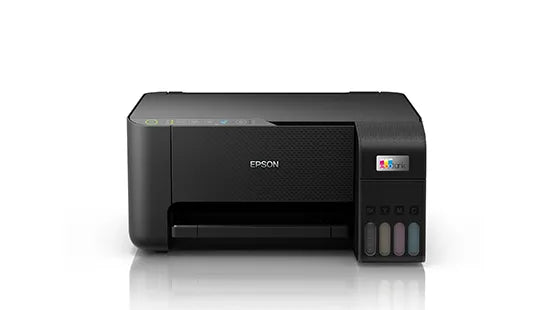
The Epson EcoTank L3250 is an A4 all-in-one inkjet printer that prints, scans, and copies. It connects via Wi-Fi and Wi-Fi Direct, delivers up to 33 pages per minute in monochrome, and comes with ink bottles yielding 8,100 black and 6,500 colour pages, enough for up to 3 years of typical home use. It is the definitive low-running-cost printer for Kenyan students, home offices, and small businesses seeking a permanent escape from expensive ink cartridges.
Epson EcoTank L3250 Technical Specifications
Epson EcoTank L3250 Print Performance Specifications
|
Specification |
Detail |
|
Printing Method |
Epson Micro Piezo™ print head |
|
Nozzle Configuration |
180 Nozzles Black, 59 Nozzles per Colour |
|
Minimum Droplet Size |
3 pl (Variable-Sized Droplet Technology) |
|
Ink Technology |
Dye Ink |
|
Printing Resolution |
5,760 x 1,440 DPI |
|
Number of Ink Colours |
4 (Black, Cyan, Magenta, Yellow) |
|
Print Speed ISO/IEC 24734 |
10 ppm Monochrome / 5 ppm Colour |
|
Print Speed (Plain Paper 75 g/m²) |
33 ppm Monochrome / 15 ppm Colour |
|
Photo Print Speed (10×15 cm) |
27 sec (Epson Premium Glossy) / 69 sec (ISO) |
Epson EcoTank L3250 Connectivity & Mobile Integration Specs
|
Specification |
Detail |
|
Interfaces |
USB, Wi-Fi, Wi-Fi Direct |
|
Mobile Printing App |
Epson iPrint (Android & iOS) |
|
Cloud & Remote Services |
Epson Connect: Email Print, Remote Print Driver |
|
Wireless Mode |
Infrastructure (Wi-Fi) + Direct (Wi-Fi Direct) |
|
Emulation |
ESC/P-R |
Epson EcoTank L3250 Paper & Media Handling Specs
|
Specification |
Detail |
|
Number of Paper Trays |
1 |
|
Paper Tray Capacity |
100 Sheets (Standard) |
|
Output Tray Capacity |
30 Sheets |
|
Supported Paper Formats |
A4, A5, A6, B5, 10×15 cm, 13×18 cm, 16:9, Legal, Letter, DL / No.10 / C6 Envelopes, User Defined |
|
Compatible Paper Weight |
64–300 g/m² |
|
Duplex Printing |
Manual |
|
Borderless Printing |
Yes (up to 10×15 cm) |
Epson EcoTank L3250 Hardware & System Resources Specs
|
Specification |
Detail |
|
Compatible OS — Windows |
XP SP3 (32-bit) and later, Vista, 7, 8, 8.1, 10; Server 2003–2016 |
|
Compatible OS — Mac |
Mac OS X 10.6.8 or later |
|
Supply Voltage |
AC 100–240 V, 50–60 Hz |
|
Printer Colour |
Black |
|
SKU |
C11CJ67405 |
Epson EcoTank L3250 Scanning & Copying Specs
|
Specification |
Detail |
|
Scanner Type |
Contact Image Sensor (CIS) |
|
Optical Resolution |
1,200 x 2,400 DPI (Horizontal x Vertical) |
|
Scan Speed — A4 Black (200 DPI) |
11 seconds (Flatbed) |
|
Scan Speed — A4 Colour (200 DPI) |
28 seconds (Flatbed) |
|
Scan Output File Formats |
BMP, JPEG, PICT, TIFF, Multi-TIFF, PDF, PNG |
|
All-in-One Functions |
Print, Scan, Copy |
Epson EcoTank L3250 Physical & Environmental Specs
|
Specification |
Detail |
|
Dimensions (W × D × H) |
375 × 347 × 179 mm |
|
Weight |
3.9 kg |
|
Energy Use — Copying |
12 W |
|
Energy Use — Ready Mode |
4.5 W |
|
Energy Use — Sleep Mode |
0.7 W |
|
Energy Use — Power Off |
0.2 W |
|
Weekly Energy Consumption (TEC) |
0.15 kWh/week |
Epson EcoTank L3250 Consumables & Yields Specs
|
Specification |
Detail |
|
Ink System |
EcoTank (Refillable Ink Tanks — No Cartridges) |
|
Compatible Ink Bottles |
Epson 103 EcoTank Series |
|
Available Colours |
Black, Cyan, Magenta, Yellow (65 ml each) |
|
Bundle Option |
103 EcoTank 4-Colour Multipack (260 ml total) |
|
Included Black Page Yield |
8,100 pages |
|
Included Colour Page Yield |
6,500 pages |
|
Estimated Ink Life |
Up to 3 years (typical home use) |
What Each Epson EcoTank L3250 Feature Means for You
1. 5,760 x 1,440 DPI, What This Means for Your Prints
DPI stands for Dots Per Inch and describes how finely the printer places ink on a page. At 5,760 x 1,440 DPI, the output is razor-sharp. Whether you are printing a university assignment in Nairobi or a product catalogue for your Westlands business, text appears crisp and colour gradients are smooth — you will not see blotchy edges or washed-out colours.

2. Wi-Fi and Wi-Fi Direct, No Cables, No Fuss
Wi-Fi connection means the printer can sit on a shelf anywhere in your home as long as it is on the same network as your laptop or phone. Wi-Fi Direct removes even that requirement — you can print straight from your smartphone without any router involved. This is particularly practical in Kenyan homes and offices where cable management is a hassle.
3. Up to 3 Years of Ink Included
The numbers are straightforward: 8,100 black pages and 6,500 colour pages from the ink bottles that come in the box. For a household printing 200 pages per month, the included black ink alone lasts over three years. You pay for the printer once; then you print thousands of pages before spending anything extra.
4. 33 Pages Per Minute for Handling Bulk Jobs
At 33 pages per minute on plain paper, a 50-page document is done in under two minutes. For small businesses printing invoices or students printing study notes ahead of exams, this speed removes a major frustration from the daily workflow.
5. Manual Duplex, Double-Sided Printing, Half the Paper Cost
Manual duplex means you print one side, flip the paper, and print the reverse. It is not automatic, but it still cuts your paper usage — and cost — by up to 50%. In a Kenyan economic environment where every shilling counts, this is a feature worth using every single day.
Why The Epson EcoTank L3250 Is a Must-Have
1. It Permanently Breaks the Cartridge-Refill Cycle
Traditional inkjet printers are deliberately designed to generate repeat spending on cartridges. The Epson EcoTank L3250 eliminates this model entirely. Ink bottles are inexpensive, widely available from authorised Epson dealers across Kenya, and each one yields thousands of pages. The long-term savings over cartridge printing are not marginal — they are transformational for any household or business that prints regularly.
2. Three Devices in One Compact, Wireless Package
Buying a separate printer, scanner, and copier costs significantly more and occupies far more desk space. At just 375 × 347 × 179 mm and 3.9 kg, this all-in-one unit handles all three tasks wirelessly, connects to phones via the Epson iPrint app, and fits comfortably in even a small home office setup in Karen or an apartment desk in Kilimani.
3. Professional-Quality Output at an Entry-Level Price Point
Variable-Sized Droplet Technology combined with a 5,760 x 1,440 DPI resolution means that the L3250 produces output that rivals more expensive machines. From crisp KRA tax compliance documents to vibrant birthday invitation prints, the quality speaks for itself — making this printer a serious tool, not just a budget compromise.
Who Is The Epson EcoTank L3250 For?
1. The Kenyan Student and Home User
Students working through KCSE or university-level coursework print hundreds of pages each term. The Epson EcoTank L3250 was purpose-built for this use case. With over 8,000 black pages included, it handles years of notes, assignments, and forms without the panic of running out of ink mid-semester — a common, frustrating, and expensive problem with cartridge printers.
2. The Small Business Owner and Home Office Professional
Entrepreneurs running SMEs from Nairobi's industrial area, Mombasa Road, or home offices in Lavington need reliable output for invoices, contracts, and flyers without eroding their margins on consumables. The low cost per page and wireless flexibility of this printer make it a natural fit for the Kenyan self-employed professional who needs results, not complications.
3. The Busy Family Household
A typical Kenyan family prints school forms, church bulletins, recipes, government documents, and occasional photos. This printer covers every one of those use cases. The borderless photo printing capability (up to 10×15 cm) means cherished family memories can be printed beautifully at home rather than requiring a trip to a print shop in town.
Real-World Performance & Expert Insights
The Epson EcoTank L3250 earns its reputation through consistent performance rather than inflated specifications. The Micro Piezo™ print head, a core Epson technology that uses electrical signals rather than heat to fire ink droplets, delivers stable, even ink distribution over the long life of the printer. This matters in the Kenyan context because it reduces the likelihood of hardware failure, and when servicing electronics locally can be costly and time-consuming, a printer engineered for longevity is not a luxury — it is a necessity.
The dye-based ink system produces vivid, true-to-life colours for everyday documents and casual photo prints. The CIS flatbed scanner at 1,200 × 2,400 DPI optical resolution produces clean digital copies of receipts, ID documents, and business paperwork — exactly what is needed when digitising records for NHIF submissions or KRA filings.
On the energy side, 12 watts during active use and just 0.7 watts in sleep mode make this a low-consumption device. With a universal voltage range of 100–240 V, it handles Kenya's 240 V mains supply without the need for a converter, and it remains stable through the minor voltage variations common in some estates and upcountry areas.
Epson EcoTank L3250 Printer Frequently Asked Questions
Is the Epson EcoTank L3250 worth buying in Kenya?
Yes, for regular printers, it absolutely is. The core value proposition is simple: you pay a higher upfront price than a basic cartridge printer, but you receive enough ink in the box to print for up to three years — and when you eventually need to refill, ink bottles cost a fraction of what cartridges do. For students, home users, and small business owners printing consistently, the total cost of ownership over two to three years is dramatically lower than any cartridge-based alternative.
Where can I find Epson EcoTank L3250 drivers?
Epson EcoTank L3250 drivers are available free of charge from Epson's official support portal. The printer supports Windows XP SP3 all the way through Windows 11, plus Mac OS X 10.6.8 and later. Search for "Epson L3250" on the Epson support website to access the latest driver packages, firmware updates, and user manuals. No third-party downloads are required or recommended.
What ink does the Epson EcoTank L3250 use?
It uses the Epson 103 EcoTank ink bottle series, available in four colours — Black, Cyan, Magenta, and Yellow (65 ml each) — as well as a convenient 4-colour multipack. These are bottled refill inks designed to be poured directly into the printer's transparent ink tanks, making it easy to monitor ink levels at a glance. They are available through authorised Epson dealers and electronics shops across Kenya.
Can I print directly from my phone using the Epson EcoTank L3250?
Yes. The printer supports the Epson iPrint app (Android and iOS), Email Print, and the Remote Print Driver through the Epson Connect platform. It also has Wi-Fi Direct, which allows you to print directly from your phone without needing a Wi-Fi router — useful for printing M-Pesa transaction receipts, scanned documents, or photos directly from your gallery.
What is the actual print speed of the Epson EcoTank L3250?
The ISO/IEC 24734 standard — a controlled benchmark — rates it at 10 pages per minute monochrome and 5 pages per minute colour. Under real-world conditions on plain 75 g/m² paper, however, speeds reach up to 33 pages per minute monochrome and 15 pages per minute colour. Photo printing on 10×15 cm Epson Premium Glossy Photo Paper takes approximately 27 seconds per print, making it a competitive option for casual home photo printing.