Hi-Specs Innovative Solutions
Dell Latitude 7300 Price in Kenya
Dell Latitude 7300 Price in Kenya
Couldn't load pickup availability
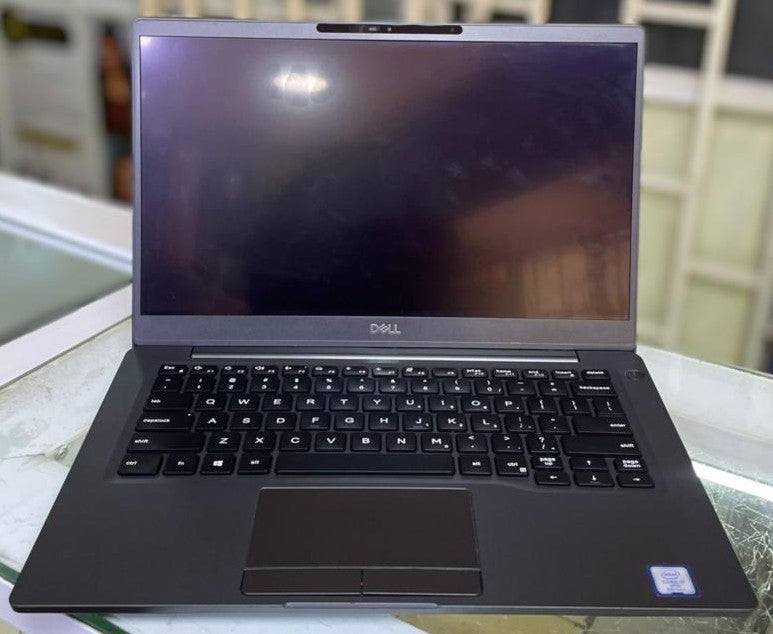
The Dell Latitude 7300 is a 13.3-inch business-class ultrabook powered by an 8th Generation Intel Core i7 or i5 processor, up to 32 GB of DDR4 RAM, an NVMe SSD, and a 60 WHr battery with ExpressCharge. It is built for mobile professionals who need enterprise security, a compact aluminium or carbon fibre chassis, and reliable connectivity, including Thunderbolt 3 via USB-C. In Kenya, it is one of the most sought-after refurbished and new business laptops among corporates, NGOs, and government institutions.
Dell Latitude 7300 Detailed technical specifications
Dell Latitude 7300 processor performance specs
|
Processor |
Cores |
Cache |
Base Frequency |
Max Turbo Frequency |
Graphics |
|
Intel Core i7-8665U (8th Gen) |
Quad-Core |
8M SmartCache |
1.9 GHz |
Up to 4.8 GHz |
Intel UHD 620 |
|
Intel Core i5-8365U (8th Gen) |
Quad-Core |
6M SmartCache |
1.6 GHz |
Up to 4.1 GHz |
Intel UHD 620 |
|
Intel Core i5-8265U (8th Gen) |
Quad-Core |
6M SmartCache |
1.6 GHz |
Up to 3.9 GHz |
Intel UHD 620 |
Dell Latitude 7300 memory & storage specs
|
Feature |
Specification |
|
Minimum RAM |
4 GB |
|
Maximum RAM |
32 GB |
|
RAM Type |
DDR4 |
|
RAM Speed |
2400 MHz |
|
RAM Slots |
Two SoDIMM |
|
RAM Configurations |
4 GB (1×4), 8 GB (1×8 or 2×4), 16 GB (1×16 or 2×8), 32 GB (2×16) |
|
Storage Type |
Solid-State Drive (SSD) |
|
Storage Form Factor |
M.2 2280 (PCIe/SATA) or M.2 2230 (PCIe) |
|
Storage Capacity |
Up to 1 TB (PCIe NVMe SSD) |
|
Self-Encrypting Drive (SED) |
Available (M.2 2280, PCIe NVMe, 256 GB) |
Dell Latitude 7300 display specs
|
Feature |
Specification |
|
Screen Size |
13.3 inches |
|
Resolution Options |
HD (1366×768) or FHD (1920×1080) |
|
Brightness (HD) |
220 nits |
|
Brightness (FHD) |
300 nits |
|
Refresh Rate |
60 Hz |
|
Display Height (Active area) |
165.24 mm (6.5 in.) |
|
Display Width (Active area) |
293.76 mm (11.55 in.) |
|
Touch Option |
FHD touch display available |
|
Privacy Option |
Dell SafeScreen (Dynamic Privacy filter) available |
Dell Latitude 7300 battery & connectivity specs
|
Feature |
Specification |
|
Battery Options |
3-cell 42 WHr / 4-cell 60 WHr / 4-cell 60 WHr LCL |
|
Battery Voltage |
11.4 VDC |
|
Standard Battery Life (charge cycles) |
300 discharge/charge cycles |
|
LCL Battery Life (charge cycles) |
1,000 discharge/charge cycles |
|
ExpressCharge (16°C–45°C) |
~2 hours to full charge |
|
Wireless |
Wi-Fi (Wireless LAN) |
|
Bluetooth |
Yes (integrated) |
|
Audio Port |
Universal audio jack (headset + mic + line-in) |
|
HDMI |
HDMI 1.4a |
|
USB |
1× USB-C 3.1 Gen 2 (Thunderbolt), 2× USB-A 3.1 Gen 1 |
|
Media Card Reader |
Micro-SD 4.0 (optional) |
|
Docking Port |
Dell USB 3.0 Dock (UNO) |
|
Security Slot |
Noble Wedge lock slot |
Dell Latitude 7300 graphics capabilities specs
|
Feature |
Specification |
|
Graphics Type |
Integrated (UMA) |
|
GPU Model |
Intel UHD Graphics 620 |
|
Architecture |
8th Generation Intel Core |
|
Dedicated GPU |
Not available |
Table 6: Dell Latitude 7300 portability and build specs
|
Feature |
Aluminium (Al) |
Carbon Fibre (CF) |
|
Height (Front) |
16.57 mm (0.65 in.) |
17.42 mm (0.69 in.) |
|
Height (Rear) |
17.52 mm (0.70 in.) |
18.45 mm (0.73 in.) |
|
Width |
306.5 mm (12.07 in.) |
306.5 mm (12.07 in.) |
|
Depth |
206.96 mm (8.15 in.) |
206.96 mm (8.15 in.) |
|
Weight |
1.30 kg (2.88 lb) |
1.25 kg (2.75 lb) |
Dell Latitude 7300 build & essentials specs
|
Feature |
Specification |
|
Chassis Material |
Aluminium or Carbon Fibre |
|
Operating System |
Windows (compatible) |
|
Keyboard |
Backlit (optional) |
|
Touchpad |
Precision touchpad with multi-gesture support |
|
Webcam |
Integrated |
|
Smart Card Reader |
Optional |
|
Coin-Cell Battery |
CR 2032 |
Dell Latitude 7300 Specifications Simplified
What the processor really means for you
The Dell Latitude 7300 core i7 8th generation chip — the i7-8665U — is a quad-core processor that can push up to 4.8 GHz when your work demands it. Think of it this way: whether you're running a heavy financial model in Excel, attending a Zoom call while downloading a 1 GB report, or managing multiple browser tabs on Safaricom's cloud platforms, this processor handles it all smoothly without lag or overheating. Even the i5 variants are fast enough to run demanding business applications without frustration.

What the RAM means for you
With up to 32 GB of DDR4 RAM running at 2400 MHz, the Dell Latitude 7300 can have dozens of applications open at the same time without slowing down. For most Kenyan office professionals using Microsoft Office, Teams, Zoom, and Chrome, 8 GB is perfectly fine — but if you work in data analysis, virtual machines, or design, 16 GB or 32 GB will transform your experience.
What the SSD means for you
Forget the slow startup times and sluggish file loading of old hard drives. The NVMe SSD in the Dell Latitude 7300 means your laptop boots up in under 10 seconds and opens large files almost instantly. With options up to 1 TB, you have room for all your documents, photos, and project files — and the optional Self-Encrypting Drive (SED) means your data is protected even if the laptop is lost or stolen, something that matters deeply in a city like Nairobi.
What the battery means for you
The 4-cell 60 WHr battery is the workhorse option. With ExpressCharge capability, it goes from flat to 80% in approximately one hour when switched off — critical for professionals who are always on the move between meetings in Westlands, Karen, or the CBD. The LCL battery variant is rated for 1,000 charge cycles, meaning it can last over 2.5 years of daily charging before degrading.
What the dell latitude 7300 ports mean for you
The dell latitude 7300 ports lineup is well thought out for a business machine. You get one Thunderbolt-enabled USB-C port (which also doubles as a high-speed data transfer and video output port), two USB-A ports for your flash drives and peripherals, HDMI for projectors and external monitors in Kenyan conference rooms, and a universal audio jack. Note that there is no built-in Ethernet port — you'll need a USB-C to Ethernet adapter or a compatible Dell dock if you need a wired connection, which is common in many Kenyan corporate setups.
What the display options mean for you
The FHD (1920×1080) panel at 300 nits is sharp and bright enough for outdoor use in Nairobi's sunny conditions. The optional Dell SafeScreen privacy filter is a genuine game-changer for anyone who handles confidential documents in open offices or on public transport like Nairobi's matatu network — it makes the screen appear black to anyone looking from the side.
Why the Dell Latitude 7300 Laptop is a must-have
1. Enterprise security built into every layer
The Dell Latitude 7300 is not just a productivity tool — it is a security fortress in laptop form. From the Noble Wedge lock slot that physically secures the machine to your desk, to the optional smart card reader that requires a physical card to log in, to the optional Self-Encrypting Drive that protects every byte of your data, to Dell SafeScreen that guards your screen from visual eavesdroppers — this laptop treats data security as a core feature, not an afterthought. For professionals handling sensitive client data, government records, or financial information in Kenya, this level of protection is invaluable.
2. A chassis that travels as hard as you do
At just 1.25 kg in the carbon fibre variant, the Dell Latitude 7300 is lighter than most A4 notepads. Toss it in your bag for the morning commute on Ngong Road, take it on a flight to Mombasa, or carry it between Nairobi's co-working spaces — it never feels like a burden. The premium aluminium and carbon fibre build means it can also take the occasional knock without cracking or warping.
3. ExpressCharge means you're never caught off-guard
Kenyan professionals know that a reliable power supply is not always guaranteed. The Dell Latitude 7300 charger, combined with ExpressCharge technology, means that even a short 30-minute plug-in during a coffee break at Java House or at JKIA can give you meaningful extra hours of power. The LCL battery variant extends this with 1,000 charge cycles of longevity — significantly above the standard 300 cycles.
Who is this Laptop Built for?
The Nairobi corporate professional
If you work at a multinational in Upper Hill, a bank in the CBD, or a consultancy in Kilimani, the Dell Latitude 7300 is built for your lifestyle. You need a machine that is presentable in boardrooms, powerful enough for Excel and PowerPoint heavy workflows, and light enough to carry from morning to evening without shoulder strain. The FHD display, premium build, and biometric security options make it a natural fit for client-facing professionals.
The NGO / development sector field worker
Kenya is home to hundreds of NGOs operating across Nairobi, Kisumu, Nakuru, and beyond. These professionals often work in the field, use data-heavy monitoring tools, and move between offices and remote locations. The long battery life, durable chassis, and fast processor make the Dell Latitude 7300 an excellent field companion — even in environments where power supply is intermittent.
The small business owner and entrepreneur
Nairobi's entrepreneurial ecosystem is booming, from iHub's tech startups to Gikomba traders going digital. For the entrepreneur who manages accounts, communicates with clients, attends Zoom meetings, and stores business records all on one machine, the Dell Latitude 7300 offers a professional-grade experience at a competitive price point in the Kenyan market.
How this laptop performs in the real world
The Dell Latitude 7300 belongs to Dell's Latitude commercial series, which is engineered to meet rigorous MIL-SPEC 810G durability standards. This means it has been tested for extreme temperature, vibration, humidity, and shock resistance — conditions that mirror the diverse environments Kenyan professionals work in, from climate-controlled Nairobi offices to field locations along the coast or in the Rift Valley.
In day-to-day use, the Intel UHD 620 integrated graphics handles video playback, presentations, and even light image editing with ease. It is not a machine for 3D rendering or gaming, but for business professionals, it does everything right. The Thunderbolt 3 port via USB-C means you can connect to a 4K monitor, a docking station, or transfer large files at up to 40 Gbps — a feature rarely found on laptops in this category and price range. The precision touchpad with multi-gesture support makes navigation smooth and accurate, reducing reliance on an external mouse.
What sets the Dell Latitude 7300 apart from generic business laptops sold across Computer shops in Nairobi's Tom Mboya Street or online on Jumia Kenya is its complete ecosystem — Dell's ProSupport, certified accessories, docking stations, and a global service network mean you are never stranded if something goes wrong.
Dell Latitude 7300 Frequently asked questions
How long does the battery dell latitude 7300 last on a single charge?
Battery life on the Dell Latitude 7300 varies based on usage, but the 4-cell 60 WHr battery is designed to last through a full workday under normal business use — typically 8 to 10 hours for tasks like document editing, video conferencing, and web browsing. For power-intensive tasks like video editing or running virtual machines, expect 4 to 6 hours. The ExpressCharge feature means that if your battery is depleted, approximately 2 hours of charging when the laptop is switched off brings it back to 100%. For professionals in Kenya who frequently work in areas with unstable power supply or are constantly between meetings, the LCL (Long Cycle Life) battery variant is worth the investment — it is rated for 1,000 charge cycles compared to the standard 300.
What are the dell latitude 7300 ports available, and is there an Ethernet port?
The Dell Latitude 7300 ports include one USB-C 3.1 Gen 2 (Thunderbolt), two USB-A 3.1 Gen 1 ports (one with PowerShare for charging devices), an HDMI 1.4a video output port, a universal audio jack, an optional micro-SD 4.0 card reader, and a Noble Wedge security lock slot. Importantly, the Dell Latitude 7300 does not have a built-in Ethernet port. If you work in a corporate environment in Kenya that relies on wired LAN connections — common in banks, hospitals, and government offices — you will need to purchase a compatible USB-C to Ethernet adapter or a Dell USB 3.0 dock. This is a known trade-off for its ultra-thin profile, and the accessories are widely available from authorised Dell dealers in Nairobi.
Is the dell latitude 7300 i7 8th generation worth buying in 2025/2026?
Yes, the Dell Latitude 7300 i7 8th generation remains an outstanding value for money proposition in the Kenyan market. The Intel Core i7-8665U is a quad-core processor capable of 4.8 GHz turbo boost, which comfortably handles all modern business applications, including Microsoft 365, video conferencing tools, cloud-based ERP systems, and web development environments. While it is not a new-generation chip, the 8th Gen U-series processors are well-optimised for low power consumption and reliability, making them well suited for long daily use. Paired with an NVMe SSD and 16 GB or 32 GB of RAM, the Dell Latitude 7300 i7 8th generation can outperform many newer budget laptops in real-world business tasks.
What type of charger does the dell latitude 7300 use?
The Dell Latitude 7300 charger connects via a standard Dell power adapter. The laptop supports both a traditional Dell barrel connector charger and charging via the USB-C/Thunderbolt port, which provides greater flexibility — particularly useful when travelling or using compatible third-party USB-C power banks and chargers. When purchasing a replacement dell latitude 7300 charger in Kenya, ensure it matches the laptop's power requirements to avoid damaging the battery or motherboard. Authorised Dell service partners in Nairobi, such as those located in Westlands and the CBD, carry genuine Dell chargers.
Does the dell latitude 7300 support external monitors and docking stations?
Yes, the Dell Latitude 7300 is built for a productive multi-screen setup. The HDMI 1.4a port allows direct connection to an external monitor or projector — essential for presentations in Kenyan conference rooms. The Thunderbolt 3 USB-C port takes this further, supporting connection to a Dell WD19 or compatible docking station that can add multiple external displays, Ethernet, additional USB ports, and more through a single cable. For office setups in Nairobi where professionals need a desktop-like experience at their desk but portability on the go, the Dell Latitude 7300 with a compatible dock delivers exactly that — a genuine two-in-one working style without compromise.