Hi-SPECS INNOVATIVE SOLUTIONS LTD
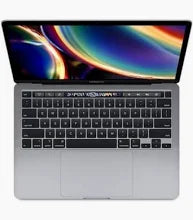
Apple MacBook Pro 2020, 13-Inch, Core i7, Backlit Magic Keyboard
Apple MacBook Pro 2020, 13-Inch, Core i7, Backlit Magic Keyboard
Couldn't load pickup availability
The MacBook Pro 2020 13-inch (Four Thunderbolt 3 ports) is a professional compact laptop featuring a 10th-generation Intel Core i5 base processor (configurable to a 2.3GHz quad-core Intel Core i7 with Turbo Boost up to 4.1GHz), 16GB of 3733MHz LPDDR4X onboard memory (configurable to 32GB), a 2560 x 1600 Retina display with 500 nits brightness and True Tone, four Thunderbolt 3 ports, a Backlit Magic Keyboard with Touch Bar and Touch ID, and up to 10 hours of wireless battery life. It is purpose-built for professionals, developers, and creatives who need a powerful, portable, and premium-grade Intel Mac.

Detailed Technical Specifications
MacBook Pro 2020 Processor Performance Specs
|
Specification |
Base Configuration |
Top Configuration |
|
Processor |
2.0GHz quad-core Intel Core i5 |
2.3GHz quad-core Intel Core i7 |
|
Generation |
10th-generation Intel |
10th-generation Intel |
|
Turbo Boost |
Up to 3.8GHz |
Up to 4.1GHz |
|
L3 Cache |
6MB shared |
8MB shared |
MacBook Pro 2020 Memory & Storage Specs
|
Specification |
Base Option |
Maximum |
|
RAM |
16GB LPDDR4X |
32GB LPDDR4X |
|
RAM Speed |
3733MHz |
3733MHz |
|
RAM Type |
Onboard (not upgradeable) |
Onboard |
|
Base Storage (512GB config) |
512GB SSD |
4TB SSD |
|
Base Storage (1TB config) |
1TB SSD |
4TB SSD |
|
Configurable Storage |
1TB, 2TB, or 4TB |
4TB SSD |
MacBook Pro 2020 Display Specs
|
Specification |
Detail |
|
Display Type |
Retina LED-backlit IPS |
|
Display Size |
13.3-inch diagonal |
|
Native Resolution |
2560 x 1600 |
|
Pixel Density |
227 pixels per inch |
|
Brightness |
500 nits |
|
Colour Gamut |
Wide colour (P3) |
|
True Tone |
Yes |
|
Supported Scaled Resolutions |
1680x1050, 1440x900, 1024x640 |
MacBook Pro 2020 Battery & Connectivity Specs
|
Specification |
Detail |
|
Battery Capacity |
58.0-watt-hour lithium-polymer |
|
Wireless Web Life |
Up to 10 hours |
|
Movie Playback Life |
Up to 10 hours |
|
Standby Time |
Up to 30 days |
|
Included Adapter |
61W USB-C Power Adapter |
|
Ports |
4x Thunderbolt 3 (USB-C) |
|
Thunderbolt 3 Speed |
Up to 40Gb/s |
|
USB Speed |
USB 3.1 Gen 2 up to 10Gb/s |
|
Wi-Fi |
802.11ac (a/b/g/n compatible) |
|
Bluetooth |
Bluetooth 5.0 |
|
Headphone Jack |
3.5mm |
MacBook Pro 2020 Graphics Capabilities Specs
|
Specification |
Detail |
|
GPU |
Intel Iris Plus Graphics (integrated) |
|
External Display Support (6K) |
One external display at 6016 x 3384 at 60Hz |
|
External Display Support (5K) |
One external display at 5120 x 2880 at 60Hz |
|
External Display Support (4K) |
Up to two displays at 4096 x 2304 at 60Hz |
|
Video Output |
Thunderbolt 3 / DisplayPort over USB-C |
|
Adapter Compatibility |
VGA, HDMI, DVI, Thunderbolt 2 (via adapters, sold separately) |
MacBook Pro 2020 Portability and Build Specs
|
Specification |
Detail |
|
Height |
0.61 inch (1.56 cm) |
|
Width |
11.97 inches (30.41 cm) |
|
Depth |
8.36 inches (21.24 cm) |
|
Weight |
3.1 pounds (1.4 kg) |
MacBook Pro 2020 Build & Essentials Specs
|
Specification |
Detail |
|
Finish Options |
Silver, Space Gray |
|
Enclosure |
Recyclable low-carbon aluminium |
|
Keyboard |
Backlit Magic Keyboard with Touch Bar, Touch ID, 65 keys (U.S.) |
|
Trackpad |
Force Touch trackpad with pressure sensing and Multi-Touch gestures |
|
Camera |
720p FaceTime HD |
|
Microphone |
Three-mic array with directional beamforming |
|
Speakers |
Stereo speakers with high dynamic range, wide stereo sound, Dolby Atmos |
|
Operating System |
macOS |
|
Certification |
ENERGY STAR |
|
Noise at Idle |
4 dB at operator position |
MacBook Pro 2020 i7 Technical Specs Explained
The Core i7 Processor: Quad-Core Speed for Demanding Tasks
The MacBook Pro 2020 i7 configuration puts a 2.3GHz quad-core 10th-generation Intel Core i7 chip in a 13-inch chassis, with Turbo Boost speeds reaching up to 4.1GHz and an 8MB shared L3 cache. In practical terms, this means the processor can sprint to high clock speeds when a demanding task — a large compilation, a video export, or a complex spreadsheet calculation — requires it, then step back down to conserve battery when the task is complete. The i7 handles everything from multi-tab browser sessions and video calls to code compilation and graphic design without hesitation or lag.
16GB of Fast LPDDR4X RAM: No Waiting, No Slowdowns
The MacBook Pro 2020 specs include 16GB of 3733MHz LPDDR4X onboard memory as standard — fast, low-power RAM that feeds the processor data quickly enough to keep everything running smoothly when multiple applications are open simultaneously. Whether you are running Xcode alongside a virtual machine, editing photos in Lightroom while referencing research in Safari, or working through a complex Excel model with multiple data sources, 16GB at this speed means the machine does not make you wait. For users with consistently heavy workloads, the 32GB configuration provides additional long-term headroom.
A 500-Nit Retina Display That Makes Everything Look Professional
The 2560 x 1600 Retina display at 227 pixels per inch renders text and images crisply at any size. At 500 nits of brightness — 100 nits brighter than the MacBook Air M1 of the same era — it remains clearly visible in bright environments including sunlit meeting rooms, outdoor terraces, and the lobbies of Nairobi's business hotels. True Tone technology automatically adjusts the display's white balance based on ambient lighting, so colours always look natural without manual adjustment. The P3 wide colour gamut ensures photos, design work, and video content display with the vividness and accuracy that professional creative work demands.
Four Thunderbolt 3 Ports: The Professional's Connectivity Advantage
Having four Thunderbolt 3 ports — rather than two — is one of the defining practical advantages of this particular MacBook Pro 2020 13-inch configuration. Each port supports charging, DisplayPort video output, Thunderbolt 3 data transfer at up to 40Gb/s, and USB 3.1 Gen 2 at up to 10Gb/s. In a real-world desk setup, this means you can charge the laptop, drive an external display, connect a Thunderbolt SSD, and plug in a USB hub — all simultaneously, without occupying every available port. For professionals in Nairobi's CBD offices or tech co-working spaces who connect multiple peripherals daily, the four-port configuration removes the friction of managing a limited port layout.
The Backlit Magic Keyboard With Touch Bar: Designed for Daily Professional Use
The redesigned Backlit Magic Keyboard on the MacBook Pro 2020 brought back proper key travel after the previous generation's butterfly switch mechanism received widespread criticism. The keys are responsive, consistent, and comfortable for extended writing and coding sessions. The Touch Bar provides dynamic, context-sensitive shortcuts — showing relevant controls for each application, including browser navigation buttons, text formatting tools, emoji, and media controls. Touch ID authenticates logins, Apple Pay, and password manager prompts with a single fingerprint touch — a small but meaningfully convenient daily feature.
Why the MacBook Pro 2020 Is a Must-Have
1. Intel Compatibility When It Still Matters The MacBook Pro 2020 runs Intel-native applications without the Rosetta 2 translation layer required by Apple Silicon Macs for apps not yet updated for the ARM architecture. For professionals who rely on specific Intel-native software — certain enterprise applications, legacy creative tools, Windows via Boot Camp, or x86-based virtual machines — the MacBook Pro 2020 provides the native Intel compatibility that Apple Silicon models do not. For this specific use case, the MacBook Pro 2020 i7 is the correct tool for the job.
2. A Compact Pro Chassis With Maximum Port Flexibility At 1.4kg and 1.56cm thin, the MacBook Pro 2020 13-inch is lightweight enough to carry everywhere and premium enough to represent your professional standard in any client or executive setting. The four-port Thunderbolt 3 configuration means you connect to the full range of professional peripherals — external drives, docks, displays, and USB hubs — without ever running out of ports or reaching for an adapter mid-meeting. This is a machine that handles the chaos of a full professional desk setup without complaint.
3. A Proven, Refined Platform With Long macOS Support The MacBook Pro 2020 runs on a mature, well-optimised hardware and software platform. The Backlit Magic Keyboard is widely regarded as the best keyboard Apple produced in the Intel MacBook Pro era. macOS continues to receive updates on Intel hardware, and the wide ecosystem of professional software is deeply optimised for this configuration. For buyers who want a proven, reliable professional machine with no surprises, the MacBook Pro 2020 price in Kenya reflects a well-understood, well-supported investment.
Who Is the MacBook Pro 2020 Built For?
The Developer Who Needs Intel Compatibility
Software engineers who work with x86-based virtual machines, Docker containers that require native Intel architecture, or enterprise tools that have not yet been updated for Apple Silicon need a laptop that runs Intel code natively. The MacBook Pro 2020 i7 delivers precisely this — a fast quad-core Intel processor, up to 32GB of DDR4 RAM, and four Thunderbolt 3 ports in a compact, professional chassis. For developers at Nairobi fintech startups, software houses, and enterprise IT departments where Intel compatibility is a genuine requirement, this machine is the right choice.
The Creative Professional and Designer
Graphic designers, brand consultants, UX designers, and visual communicators who work with Adobe Creative Cloud, Sketch, or Figma daily need a sharp, colour-accurate display and enough processing power to handle large file sets and multi-layer compositions. The MacBook Pro 2020 13-inch delivers both — the Retina display with P3 wide colour for accurate visual work, and the i7 processor with 16GB RAM to handle demanding creative software without lag. For designers working with Kenyan and regional brand clients from Nairobi offices in Kilimani or Upper Hill, the MacBook Pro 2020 specs provide exactly what professional creative work requires.
The Compact-Obsessed Executive Who Refuses to Sacrifice Power
Senior professionals who travel regularly across Kenya and East Africa — attending conferences, meeting clients in Mombasa or Kisumu, presenting to boards — need a laptop that is light enough to carry without fatigue but powerful enough to handle any task without embarrassing pauses. At 1.4kg and 1.56cm thin, the MacBook Pro 2020 13-inch fits this role precisely. The 10-hour battery handles a full day of mixed professional use, and the premium aluminium build in Silver or Space Gray projects exactly the professional standard expected at the executive level.
Built to Last, Ready to Perform: The Real-World Case for the MacBook Pro 2020
The MacBook Pro 2020 is the final and most refined expression of Apple's Intel 13-inch MacBook Pro. The Backlit Magic Keyboard — a genuine improvement over the butterfly keyboards that preceded it — brought back the key travel and typing comfort that professionals who type extensively demand. The aluminium enclosure is rigid, scratch-resistant, and carries the same build language as every MacBook Pro: a machine built to withstand daily professional use through years of travel, desk work, and transportation.
In daily use, the machine runs quietly at light-to-moderate workloads. Noise emission at idle is rated at just 4 dB at the operator position, meaning it is near-silent during browsing, document work, and light creative tasks. Under sustained heavy loads the cooling system engages, but thermal management is well-handled — performance remains consistent during extended export or compilation sessions.
The MacBook Pro 2020 price in kenya reflects a mature, well-understood piece of professional hardware. The four-port Thunderbolt 3 configuration in particular is a practical advantage that many buyers overlook when comparing configurations — having two additional ports on the right side of the machine fundamentally changes what you can connect simultaneously without a hub. For professionals who use their laptop at a desk with multiple peripherals, this is a daily convenience that is difficult to quantify but immediately noticed.
MacBook Pro 2020 Frequently Asked Questions
Is the MacBook Pro 2020 i7 Still Worth Buying?
Yes, for specific use cases. The MacBook Pro 2020 i7 remains a capable professional Intel Mac with excellent build quality, a sharp Retina display, and a reliable quad-core processor. It is the right choice for users who need Intel-native compatibility — for Boot Camp, x86 virtual machines, or specific enterprise software — and who prefer a compact 13-inch form factor. For users who do not have specific Intel requirements, Apple Silicon models like the MacBook Air M2 or M4 now offer better performance and battery life at competitive price points. The MacBook Pro 2020 price in Kenya reflects its position as a mature but proven professional platform.
What Is the Difference Between the MacBook Pro 2020 i5 and i7 Configurations?
The base MacBook Pro 2020 13-inch configuration ships with a 2.0GHz quad-core Intel Core i5, while the i7 configuration offers a 2.3GHz quad-core Intel Core i7 with Turbo Boost up to 4.1GHz and an 8MB L3 cache compared to 6MB on the i5. In practical terms, the i7 completes CPU-intensive tasks — video exports, code compilation, complex data processing — noticeably faster, particularly when Turbo Boost is engaged. For everyday tasks like browsing, email, and document editing, both configurations perform similarly. If your workflow regularly involves sustained heavy CPU workloads, the i7 upgrade is worthwhile. Both configurations ship with 16GB of LPDDR4X RAM as standard.
What Are the MacBook Pro 2020 Specs for External Display Support?
The MacBook Pro 2020 specs support one external display at up to 6016 x 3384 (6K) resolution at 60Hz, or one external display at 5120 x 2880 (5K) at 60Hz, or up to two external displays at 4096 x 2304 (4K) resolution at 60Hz — all via Thunderbolt 3. VGA, HDMI, DVI, and Thunderbolt 2 output is available using adapters sold separately. The four-port configuration means you can drive external displays from either side of the machine, which is a genuine practical convenience in desk setups where cable management and monitor positioning vary.
How Does the Four-Port Configuration Differ From the Two-Port MacBook Pro 2020?
Apple released two 13-inch MacBook Pro 2020 models — one with two Thunderbolt 3 ports and one with four. The four-port configuration (this model) ships with the faster 10th-generation Intel processors, starting at the 2.0GHz Core i5, and includes 16GB of RAM as standard. The two-port model features slower 8th-generation processors and starts with 8GB of RAM. The four-port model is the significantly more capable configuration in every measurable way — more CPU performance, more base RAM, faster memory, and double the port count for peripherals and displays.
Does the MacBook Pro 2020 Support Boot Camp to Run Windows?
Yes. As an Intel-based Mac, the MacBook Pro 2020 fully supports Apple's Boot Camp Assistant, which allows you to install and run Windows 10 natively on the hardware. This is a significant advantage over Apple Silicon Macs, which do not support Boot Camp and require virtualisation solutions to run Windows. For professionals in Kenya who need to run Windows-specific enterprise software, accounting platforms, or industry tools alongside macOS, the MacBook Pro 2020's native Boot Camp compatibility is a meaningful practical advantage that Apple Silicon models cannot replicate.