Hi-SPECS INNOVATIVE SOLUTIONS LTD
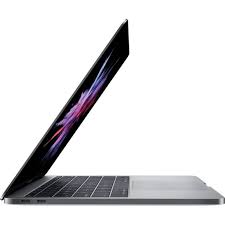
Apple MacBook Pro 2018, 13-Inch, Intel Iris Plus Graphics 655
Apple MacBook Pro 2018, 13-Inch, Intel Iris Plus Graphics 655
Couldn't load pickup availability
The MacBook Pro 2018 (13-inch, Four Thunderbolt 3 ports) is a high-performance professional laptop featuring a 2.3GHz quad-core Intel Core i5 processor with Turbo Boost up to 3.8GHz, Intel Iris Plus Graphics 655, a 2560x1600 Retina display with True Tone technology, 8GB of 2133MHz LPDDR3 memory, and up to 10 hours of battery life. It is built for professionals, creatives, and knowledge workers who need reliable, portable computing power in a premium aluminium chassis.

Detailed Technical Specifications
MacBook Pro 2018 Processor Performance Specs
|
Specification |
Details |
|
Base Processor |
2.3GHz quad-core Intel Core i5 |
|
Turbo Boost |
Up to 3.8GHz |
|
eDRAM |
128MB |
|
Configurable Processor |
2.7GHz quad-core Intel Core i7 |
|
i7 Turbo Boost |
Up to 4.5GHz |
|
i7 eDRAM |
128MB |
MacBook Pro 2018 Memory & Storage Specs
|
Specification |
Details |
|
Standard Memory |
8GB of 2133MHz LPDDR3 onboard |
|
Configurable Memory |
16GB of 2133MHz LPDDR3 |
|
Standard Storage |
256GB SSD or 512GB SSD |
|
Configurable Storage |
512GB, 1TB, or 2TB SSD |
MacBook Pro 2018 Display Specs
|
Specification |
Details |
|
Display Type |
Retina, LED-backlit with IPS technology |
|
Screen Size |
13.3 inches (diagonal) |
|
Native Resolution |
2560 x 1600 at 227 pixels per inch |
|
Colour Support |
Millions of colours |
|
Brightness |
500 nits |
|
Wide Colour |
P3 wide colour gamut |
|
True Tone |
Yes |
|
Scaled Resolutions |
1680x1050, 1440x900, 1024x640 |
MacBook Pro 2018 Battery & Connectivity Specs
|
Specification |
Details |
|
Battery Capacity |
58.0-watt-hour lithium-polymer |
|
Wireless Web Battery Life |
Up to 10 hours |
|
Movie Playback Battery Life |
Up to 10 hours |
|
Standby Time |
Up to 30 days |
|
Power Adapter |
61W USB-C |
|
Wi-Fi |
802.11ac (a/b/g/n compatible) |
|
Bluetooth |
Bluetooth 5.0 |
|
Ports |
Four Thunderbolt 3 (USB-C) |
|
Thunderbolt Speed |
Up to 40Gb/s |
|
USB Speed |
USB 3.1 Gen 2 — up to 10Gb/s |
|
Headphone Jack |
3.5mm |
MacBook Pro 2018 Graphics Capabilities Specs
|
Specification |
Details |
|
Integrated GPU |
Intel Iris Plus Graphics 655 |
|
External Display Support |
One 5120x2880 (5K) at 60Hz, over one billion colours |
|
Dual Display Support |
Up to two 4096x2304 at 60Hz, or two 3840x2160 at 60Hz |
|
Video Output |
Thunderbolt 3 (native DisplayPort over USB-C) |
|
Adapter Support |
VGA, HDMI, DVI, Thunderbolt 2 (via adapters, sold separately) |
MacBook Pro 2018 Portability and Build Specs
|
Specification |
Details |
|
Height |
0.59 inch (1.49 cm) |
|
Width |
11.97 inches (30.41 cm) |
|
Depth |
8.36 inches (21.24 cm) |
|
Weight |
3.02 pounds (1.37 kg) |
|
Finish Options |
Silver, Space Gray |
MacBook Pro 2018 Build & Essentials Specs
|
Specification |
Details |
|
Keyboard |
Full-size backlit with Touch Bar and Touch ID |
|
Keys |
64 (U.S.) or 65 (ISO) |
|
Trackpad |
Force Touch with pressure-sensing and Multi-Touch gestures |
|
Camera |
720p FaceTime HD |
|
Microphones |
Three microphones |
|
Speakers |
Stereo with high dynamic range |
|
Enclosure |
Highly recyclable aluminium |
|
Display Glass |
Arsenic-free |
|
Operating Temperature |
10°C to 35°C |
|
Operating System |
macOS Mojave |
|
Certifications |
EPEAT Gold, ENERGY STAR compliant |
MacBook Pro 2018 Technical Specs Explained
A Quad-Core Processor That Works as Hard as You Do
The 2.3GHz quad-core Intel Core i5 chip with Turbo Boost up to 3.8GHz means this laptop automatically speeds up when your workload demands it — whether you are encoding a video, running a presentation, or managing ten browser tabs at once. If you upgrade to the i7 configuration, Turbo Boost reaches 4.5GHz, delivering a noticeable step up for intensive professional tasks. The 128MB of eDRAM acts as a high-speed buffer that helps the processor and graphics work together more efficiently, reducing the sluggishness you might experience on machines without it.
A Display That Makes Everything Look Its Best
The 13.3-inch Retina display renders at 2560 x 1600 pixels — 227 pixels per inch. What this means in practice is that text is razor-sharp, photos look true-to-life, and even small design details are crisp and clear. At 500 nits, the display is bright enough to stay readable in well-lit co-working spaces along Westlands or under the fluorescent lights of a Nairobi office. True Tone technology automatically adjusts the screen's colour temperature to match the ambient light around you, which reduces eye strain during extended work sessions significantly.
Touch Bar and Touch ID — Your Shortcut to Everything
The Touch Bar is an OLED strip above the keyboard that adapts to the app you are using. When you are in Safari, it displays your tabs. In Pages, it shows text formatting options. In GarageBand, it shows your audio tracks. It removes the need to navigate menus constantly, keeping your hands on the keyboard and your focus on your work. Touch ID — built directly into the Touch Bar — lets you log in and authorise Apple Pay purchases with a single fingerprint tap. It is faster than typing a password and significantly more secure.
Ten Hours of Battery — Freedom from the Power Socket
The 58.0-watt-hour battery delivers up to 10 hours of wireless web browsing and 10 hours of movie playback. For professionals in Nairobi who spend long days in meetings, on campus, or travelling between locations like the CBD and Gigiri, this means a full workday without needing to carry your charger. The 30-day standby time means the laptop retains its charge even when stored over a long weekend.
Four Thunderbolt 3 Ports — One Standard, Total Flexibility
Every port on this MacBook Pro is a Thunderbolt 3 port capable of transferring data at up to 40Gb/s, outputting to a 5K monitor, and charging the laptop — all from the same cable. With the right adapters, these four ports give you access to HDMI monitors, USB-A drives, SD cards, VGA projectors, and Gigabit Ethernet. Having four ports rather than two also means you are not forced to choose between charging and connecting peripherals.
Why This Is a Must-Have
1. Professional-Grade Performance in a Carry-On-Friendly Package At 1.37 kg and just 1.49 cm thin, the MacBook Pro 2018 is light enough to travel with daily without strain, yet powerful enough to replace a desktop for most professional tasks. The combination of a quad-core processor, fast SSD storage, and up to 16GB of RAM means it handles complex work without compromise, whether you are in a Nairobi office or working remotely from the coast.
2. A Secure, Intuitive macOS Ecosystem That Just Works macOS Mojave introduced a redesigned App Store, Dark Mode, and powerful built-in apps including Final Cut Pro X and Logic Pro X support. The operating system is engineered specifically for Apple hardware, which means better performance, longer battery life, and fewer compatibility issues compared to general-purpose operating systems. Built-in apps like Pages, Numbers, Keynote, iMovie, and GarageBand mean you have a full productivity and creative suite without paying for additional software.
Is the MacBook Pro 2018 Right for You?
The Nairobi Creative and Media Professional
You work in graphic design, photography editing, video production, or content creation. You need a display that renders colour accurately, a processor that handles large files without stuttering, and a build quality that reflects the professionalism you bring to your clients. The MacBook Pro 2018's P3 wide-colour Retina display, quad-core Intel Core i5 or i7 processor, and the ability to connect to a 5K external monitor make it an ideal primary workstation for creatives operating in Nairobi's growing digital economy. The Force Touch trackpad also provides pressure-sensitive drawing support, useful for design work without a dedicated graphics tablet.
The Student and Academic at Kenya's Universities
Whether you are attending the University of Nairobi, Strathmore University, or USIU-Africa, you need a laptop that handles research, presentations, video calls, and note-taking through long days. The MacBook Pro 2018's 10-hour battery life gets you through lectures and study sessions without worrying about finding a power outlet. Its lightweight 1.37 kg build means carrying it daily is not a burden. macOS's built-in accessibility features — VoiceOver, Zoom, Closed Captions, Switch Control, and Text to Speech — make it one of the most inclusive and adaptable laptops available for diverse learning needs.
The Business Professional and Executive
You need a machine that is reliable in client meetings, fast for data-heavy presentations, secure for sensitive business information, and versatile enough to connect to boardroom displays and external monitors. The MacBook Pro 2018's Touch ID provides enterprise-grade biometric security. Its four Thunderbolt 3 ports handle conference room HDMI connections and Ethernet adapters. Bluetooth 5.0 and 802.11ac Wi-Fi ensure stable, fast wireless connectivity in any modern office environment across Nairobi's business districts.
Built to Last: Real-World Performance You Can Count On
The MacBook Pro 2018 was engineered to a standard that still holds up in demanding professional environments today. Apple's testing — conducted in June 2018 — used a 2.3GHz quad-core Intel Core i5 configuration with 8GB RAM and 512GB SSD, the same configuration available to buyers right now. The results: consistent 10-hour battery performance under real browsing conditions, with display brightness set at a practical 75%.
The aluminium enclosure is not cosmetic — it functions as a passive thermal management system, drawing heat away from the processor and dissipating it through the chassis. This is why the MacBook Pro 2018 runs quietly under load; during idle and standard wireless web use, the declared noise level at the operator position is just 4 dB — virtually inaudible.
The Force Touch trackpad is one of the finest inputs on any laptop available. Its pressure-sensing technology enables precise cursor control, Force clicks, and Multi-Touch gestures that eliminate the need for an external mouse in most workflows. The ambient light sensor in the keyboard adjusts backlight brightness automatically, so the keyboard remains readable in low-light environments such as evening work sessions or dim conference rooms.
With EPEAT Gold certification, arsenic-free display glass, a mercury-free LED backlight, and a BFR-free and beryllium-free build, the MacBook Pro 2018 also meets the highest environmental standards — relevant for organisations in Kenya and across East Africa that are adopting sustainable procurement policies.
MacBook Pro 2018 Frequently Asked Questions
Is the MacBook Pro 2018 Still a Good Buy in Kenya Today?
Yes — for most professional and academic workflows, the MacBook Pro 2018 13-inch remains a highly capable and reliable machine. Its 2.3GHz quad-core Intel Core i5 processor with Turbo Boost up to 3.8GHz, fast SSD storage, and 8GB of LPDDR3 memory handle everyday productivity, creative applications, and business software without difficulty. It runs macOS updates well, supports a wide ecosystem of professional software, and holds strong resale value in the Kenyan market. For buyers who need a premium laptop at a more accessible price point than the latest models, the MacBook Pro 2018 delivers excellent value.
What Is the MacBook Pro 2018 Chip?
The MacBook Pro 2018 13-inch (Four Thunderbolt 3 ports) uses Intel processors — not Apple Silicon. The base configuration features a 2.3GHz quad-core Intel Core i5 with 128MB of eDRAM and Turbo Boost up to 3.8GHz. It can be configured with a 2.7GHz quad-core Intel Core i7 that reaches 4.5GHz via Turbo Boost. Both chips are paired with Intel Iris Plus Graphics 655 for all display and GPU tasks. These Intel processors are fully capable for general professional workloads, including office productivity, light-to-moderate video editing, design work, and software development.
What Is Special About the MacBook Pro 2018 Keyboard?
The MacBook Pro 2018 features a full-size backlit keyboard with 64 keys (U.S.) or 65 keys (ISO), including four arrow keys. It incorporates the Touch Bar — an OLED display strip above the keyboard that shows context-sensitive controls based on the active application — and Touch ID, a fingerprint sensor integrated directly into the Touch Bar for fast, secure login and Apple Pay authorisation. The keyboard also includes an ambient light sensor that automatically adjusts the keyboard backlight to match your environment, ensuring visibility in any lighting condition.
How Many Ports Does the MacBook Pro 2018 Have?
The MacBook Pro 2018 13-inch (Four Thunderbolt 3 ports model) features four Thunderbolt 3 (USB-C) ports, two on each side. Every port supports charging, DisplayPort video output, Thunderbolt data transfer at up to 40Gb/s, and USB 3.1 Gen 2 at up to 10Gb/s. Using adapters available from Apple or third-party suppliers in Nairobi, you can connect HDMI displays, USB-A drives, SD card readers, VGA projectors, Thunderbolt 2 devices, and Gigabit Ethernet. The laptop also includes a 3.5mm headphone jack on the right side.
What Are the MacBook Pro 2018 13-Inch Specs for Memory and Storage?
The MacBook Pro 2018 13-inch ships with 8GB of 2133MHz LPDDR3 onboard memory, configurable to 16GB. Storage starts at 256GB SSD, with options to configure up to 512GB, 1TB, or 2TB SSD. Because the memory is soldered onboard, the configuration chosen at purchase is permanent — if you anticipate heavy multitasking, large file handling, or running virtual machines, it is worth upgrading to 16GB and a larger SSD at the time of purchase. The SSD storage in this model is fast and silent, contributing to the MacBook Pro 2018's overall responsiveness and reliability.