Hi-SPECS INNOVATIVE SOLUTIONS LTD
Apple MacBook Air M1 2020 Price in Kenya with Backlit Keyboard
Apple MacBook Air M1 2020 Price in Kenya with Backlit Keyboard
Couldn't load pickup availability
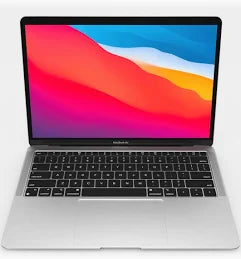
The MacBook Air M1 is a 13.3-inch fanless laptop powered by Apple's first-generation M1 chip, featuring an 8-core CPU, up to an 8-core GPU, a 16-core Neural Engine, a 2560 x 1600 Retina display with True Tone and P3 wide colour, up to 15 hours of wireless web browsing, up to 18 hours of video playback, and up to 2TB of SSD storage. Available in Gold, Silver, and Space Gray, it is Apple's most accessible entry point into Apple Silicon and a capable everyday laptop for students, professionals, and creatives across Kenya.

Detailed Technical Specifications
MacBook Air M1 Processor Performance Specs
|
Specification |
Detail |
|
Chip |
Apple M1 |
|
CPU Cores |
8-core (4 performance + 4 efficiency cores) |
|
GPU Cores |
7-core (base) or 8-core (higher configurations) |
|
Neural Engine |
16-core |
|
Architecture |
Apple Silicon (ARM-based, unified memory) |
|
Cooling |
Fanless — fully passive thermal design |
MacBook Air M1 Memory & Storage Specs
|
Specification |
Base Option |
Maximum |
|
Unified Memory |
8GB |
16GB |
|
Memory Type |
Unified (shared by CPU and GPU) |
Unified |
|
Base Storage |
256GB SSD |
2TB SSD |
|
Configurable Storage |
512GB, 1TB, or 2TB SSD |
2TB SSD |
MacBook Air M1 Display Specs
|
Specification |
Detail |
|
Display Type |
Retina LED-backlit IPS |
|
Display Size |
13.3-inch diagonal |
|
Native Resolution |
2560 x 1600 |
|
Pixel Density |
227 pixels per inch |
|
Brightness |
400 nits |
|
Colour Gamut |
Wide colour (P3) |
|
True Tone |
Yes |
|
Supported Scaled Resolutions |
1680x1050, 1440x900, 1024x640 |
MacBook Air M1 Battery & Connectivity Specs
|
Specification |
Detail |
|
Battery Capacity |
49.9-watt-hour lithium-polymer |
|
Wireless Web Life |
Up to 15 hours |
|
Movie Playback Life |
Up to 18 hours |
|
Included Adapter |
30W USB-C Power Adapter |
|
Ports |
2x Thunderbolt / USB 4 |
|
Thunderbolt 3 Speed |
Up to 40Gb/s |
|
USB 4 Speed |
Up to 40Gb/s |
|
USB 3.1 Gen 2 Speed |
Up to 10Gb/s |
|
Wi-Fi |
Wi-Fi 6 (802.11ax), backward compatible a/b/g/n/ac |
|
Bluetooth |
Bluetooth 5.0 |
|
Headphone Jack |
3.5mm |
MacBook Air M1 Graphics Capabilities Specs
|
Specification |
Detail |
|
GPU |
Apple M1 7-core or 8-core GPU (integrated in M1 chip) |
|
Memory |
Unified — shared with CPU |
|
External Display Support |
One external display at up to 6K resolution at 60Hz |
|
Video Output |
Thunderbolt 3 / DisplayPort over USB-C |
|
Adapter Compatibility |
VGA, HDMI, DVI, Thunderbolt 2 (via adapters, sold separately) |
MacBook Air M1 Portability and Build Specs
|
Specification |
Detail |
|
Height |
0.16–0.63 inch (0.41–1.61 cm) |
|
Width |
11.97 inches (30.41 cm) |
|
Depth |
8.36 inches (21.24 cm) |
|
Weight |
2.8 pounds (1.29 kg) |
MacBook Air M1 Build & Essentials Specs
|
Specification |
Detail |
|
Colour Options |
Gold, Silver, Space Gray |
|
Enclosure |
100% recycled aluminium |
|
Keyboard |
Backlit Magic Keyboard with Touch ID, 78 keys (U.S.), 12 function keys |
|
Trackpad |
Force Touch trackpad with pressure sensing and Multi-Touch gestures |
|
Camera |
720p FaceTime HD with advanced image signal processor |
|
Microphone |
Three-mic array with directional beamforming |
|
Speakers |
Stereo speakers with wide stereo sound and Dolby Atmos |
|
Operating System |
macOS (Apple Intelligence capable) |
|
Fan |
None — fully fanless |
|
Noise at Idle |
3 dB at operator position |
|
Certification |
ENERGY STAR |
MacBook Air M1 Technical Specs Explained
The M1 Chip: Fast, Silent, and Efficient All at Once
The Apple M1 chip integrates the CPU, GPU, and Neural Engine on a single piece of silicon with a unified memory pool shared between all components. The result is a machine that does more in less time while consuming dramatically less power than Intel-based alternatives. Because the M1 generates so little heat, the MacBook Air M1 13-inch has no fan at all — it runs in complete silence, in every situation, always. For students studying in the library at the University of Nairobi, or professionals working in quiet open-plan offices across Nairobi's CBD, this means a laptop that never disrupts the people around you, even under sustained workloads.
15 to 18 Hours of Battery: A Full Day, Genuinely
The MacBook Air M1 specs include up to 15 hours of wireless web browsing and up to 18 hours of Apple TV app movie playback from a 49.9Wh battery. In real mixed-use conditions — a combination of browsing, document work, video calls, and light creative tasks — most users consistently achieve 10 to 13 hours on a single charge. For students attending all-day lectures, or professionals moving between morning meetings and evening project work in Nairobi, this battery performance means one charge in the morning and no charger required for the rest of the day.
A Retina Display Sharp Enough for Professional Creative Work
The 2560 x 1600 Retina display renders at 227 pixels per inch, making text, images, and video crisp and clear without any visible pixelation. True Tone technology automatically adjusts the white balance based on the room's ambient light, so the screen always looks natural — whether you are in a brightly lit office in Westlands or a dimly lit café. At 400 nits, brightness is adequate for most indoor environments. P3 wide colour coverage means colours in photos and design work are more vivid and accurate than on standard sRGB displays, making the MacBook Air M1 a capable screen for photo editing and visual content creation.
Wi-Fi 6: Reliable, Fast Wireless Connectivity
The MacBook Air M1 2020 includes Wi-Fi 6 (802.11ax) — the most current Wi-Fi generation at its time of launch. Wi-Fi 6 delivers faster speeds and more stable performance in environments with many connected devices, such as busy co-working spaces, university campuses, and corporate offices. For everyday work including video calls, cloud-based document editing, and large file transfers, Wi-Fi 6 provides a noticeably more consistent experience than older Wi-Fi standards.
Touch ID and the Force Touch Trackpad: Designed for Everyday Ease
Touch ID allows you to log in, unlock your Mac, and authenticate purchases instantly with a single fingerprint touch — no typing a password every time the screen locks. The Force Touch trackpad is the most gesture-capable trackpad available on any laptop, supporting two-finger scrolling, pinch-to-zoom, three-finger drag, and a full library of macOS gestures that make navigation faster and more intuitive. For users switching from a non-Apple laptop, these two features alone represent a meaningful improvement in day-to-day usability.
Why the MacBook Air M1 Is a Must-Have
1. Apple Silicon Performance at the Most Accessible Price in the Mac Range The MacBook Air M1 delivers genuine Apple Silicon performance — fast, efficient, and capable of handling demanding professional and creative workflows — at a price point that makes it accessible to a much wider range of buyers than the MacBook Pro range. The MacBook Air M1 2020 price in Kenya represents exceptional value for what you receive: a fanless, lightweight, long-lasting laptop that outperforms many competing machines at the same price. For students, early-career professionals, and budget-conscious buyers who do not want to compromise on quality, the MacBook Air M1 is the clearest value proposition in the entire Apple laptop lineup.
2. Completely Silent Operation, for Life No fan means no fan noise — ever. The MacBook Air M1 operates at just 3 dB at the operator position during idle and web browsing, which is inaudible in any normal environment. This is not a laptop that stays quiet until it gets busy and then spins up loudly — the fanless design means it is silent under every workload it can handle. For users who find fan noise distracting or who work in environments where silence is important — libraries, recording spaces, quiet offices — this characteristic is genuinely valuable and not replicable on a laptop with active cooling.
3. Three Colours, Recycled Aluminium, and a Build That Outlasts Cheaper Alternatives The MacBook Air M1 colours — Gold, Silver, and Space Gray — all share the same 100% recycled aluminium enclosure that is rigid, premium, and resistant to the flexing and degradation that affects plastic chassis laptops over time. The aluminium build means the MacBook Air M1 maintains its quality and appearance through years of daily use in a way that most competing laptops in its price range simply do not. For buyers making a long-term investment in a laptop they will use daily for three to five years, build quality matters — and the MacBook Air M1 delivers it.
Who Is the MacBook Air M1 Built For?
The Kenyan University Student
Students across Kenya's universities carry their laptops to lectures, libraries, study groups, and part-time jobs — often for twelve or more hours a day. The Apple MacBook Air M1 is designed for exactly this pattern of use. The 1.29kg weight makes it easy to carry all day. The 15-to-18-hour battery means it survives the full academic day and into the evening without needing a charge. The M1 chip handles coursework software, design tools, coding environments, and video conferencing without slowing down. For students at Daystar University, Kenyatta University, or the Technical University of Kenya who need a reliable, capable machine that will last through their degree, the MacBook Air M1 2020 price in kenya represents genuine long-term value.
The Everyday Professional and Remote Worker
Professionals who use their laptop for document work, spreadsheets, presentations, video calls, email, and browsing — the core of most office and remote work — will find the MacBook Air M1 handles all of it effortlessly, silently, and for a full working day on a single charge. The compact 13.3-inch form factor fits comfortably on small desks, in co-working spaces like Nairobi Garage or The Foundry, and in economy-class airline seats. The MacBook Air M1 specs provide more than enough headroom for professional productivity without the cost of a MacBook Pro.
The Creative Beginner and Social Media Producer
Photographers editing in Lightroom, video creators producing short-form content for YouTube or Instagram, and podcasters recording and editing audio will find the M1 chip handles these tasks with ease. The 8-core GPU delivers smooth playback and export performance for standard creative workloads. The Retina display's P3 wide colour ensures photos and videos look accurate and vibrant on screen. For creative professionals who are building their careers and need a capable creative machine without a Pro-level price tag, the MacBook Air M1 13-inch is an excellent starting point.
Tried, Tested, and Trusted: The Real-World Case for the MacBook Air M1
The MacBook Air M1 redefined what an entry-level MacBook could be. In daily use, the machine delivers on its headline promises entirely. The fanless design is not a gimmick or a thermal compromise — the M1 chip runs efficiently enough that the lack of active cooling causes no performance throttling under the workloads the MacBook Air M1 is designed for. The 3 dB noise rating at idle and during wireless web use is, in practice, complete silence.
The wedge-shaped aluminium chassis tapers from 1.61cm at its thickest point to just 0.41cm at the front edge — making it one of the most instantly recognisable and elegantly portable laptop designs in the industry. At 1.29kg, it is light enough to carry in a bag all day without noticing it. The MacBook Air M1 colours — particularly the warm Gold finish, which is unique in the laptop market — give buyers a genuine choice of personality that most laptop manufacturers do not offer.
The macOS ecosystem continues to add value over time. Built-in apps including GarageBand, iMovie, Pages, Numbers, and Keynote cover a broad range of creative and professional needs from day one. Regular macOS updates continue to deepen Apple Silicon optimisation, meaning the MacBook Air M1 continues to gain performance improvements through software. Apple Intelligence is also supported on M1 and later chips, meaning this machine is capable of running Apple's on-device AI features as macOS evolves — a meaningful forward-compatibility benefit for a machine that many buyers will own for four or five years.
MacBook Air M1 Frequently Asked Questions
Is the MacBook Air M1 2020 Still Worth Buying in Kenya?
Yes, for everyday professional and student use, the MacBook Air M1 remains a highly capable machine. The M1 chip still delivers smooth performance for the vast majority of everyday tasks — productivity, creative work, software development, and communication. The MacBook Air M1 2020 price in kenya is typically lower than newer M2 and M4 models, making it the most accessible entry point into Apple Silicon. If the features introduced in the M2 MacBook Air — the Liquid Retina display upgrade, MagSafe 3 charging, the 1080p camera, and dual external display support — are important to your workflow, the M2 is worth the additional investment. For most everyday users, the M1 remains a smart, future-proof purchase.
What Are the MacBook Air M1 Colours Available?
The MacBook Air M1 colours are Gold, Silver, and Space Gray. Gold is a warm, champagne-toned finish that is distinctive and elegant. Silver is a bright, neutral tone that reads as clean and professional in any setting. Space Gray is a darker charcoal that has a more understated, modern appearance. All three are built from 100% recycled aluminium and carry the same premium, rigid build quality. Unlike the MacBook Air M2 and M4, the M1 does not include a Midnight or Starlight option — the three-colour range reflects the design language of the 2020 MacBook Air generation.
How Much Unified Memory Do I Need on the MacBook Air M1?
The MacBook Air M1 starts with 8GB of unified memory, configurable to 16GB. Because M1 unified memory is shared between the CPU and GPU and accessed at very high bandwidth, 8GB on the M1 performs comparably to 12GB or more of conventional DDR4 RAM for most everyday tasks. For general productivity, browsing, light creative work, and standard development, 8GB is sufficient. If you regularly run multiple demanding applications simultaneously, work with large video files, or plan to keep the machine for four or more years, 16GB is the better long-term choice. Memory on the M1 MacBook Air cannot be upgraded after purchase, so it is worth choosing the right configuration at the time of buying.
What External Display Options Does the MacBook Air M1 Support?
The MacBook Air M1 13-inch supports one external display at up to 6K resolution at 60Hz via Thunderbolt 3. Native DisplayPort output is available over USB-C, and VGA, HDMI, DVI, and Thunderbolt 2 connectivity is available via adapters sold separately. Like the MacBook Air M2, the M1 model supports only one external display while the built-in display is also active. Users who need two external monitors will require a DisplayLink-compatible USB-C hub or dock to achieve this, as the M1 chip's native display engine supports a maximum of one external display simultaneously.
Does the MacBook Air M1 Have a Touch Bar?
No. The MacBook Air M1 does not include a Touch Bar. Unlike the MacBook Pro range of the same era, the MacBook Air M1 uses a standard function key row — twelve full-size function keys — with a dedicated Touch ID sensor for fingerprint authentication. The absence of the Touch Bar is considered an advantage by many users, as the traditional function key row provides direct, reliable access to brightness, volume, media controls, and keyboard brightness without the contextual switching of the Touch Bar. Touch ID for login and Apple Pay authentication is included as a standalone sensor above the keyboard.