Hi-SPECS INNOVATIVE SOLUTIONS LTD
Apple M1 MacBook Pro Price in Kenya, 13-Inch 2020
Apple M1 MacBook Pro Price in Kenya, 13-Inch 2020
Couldn't load pickup availability
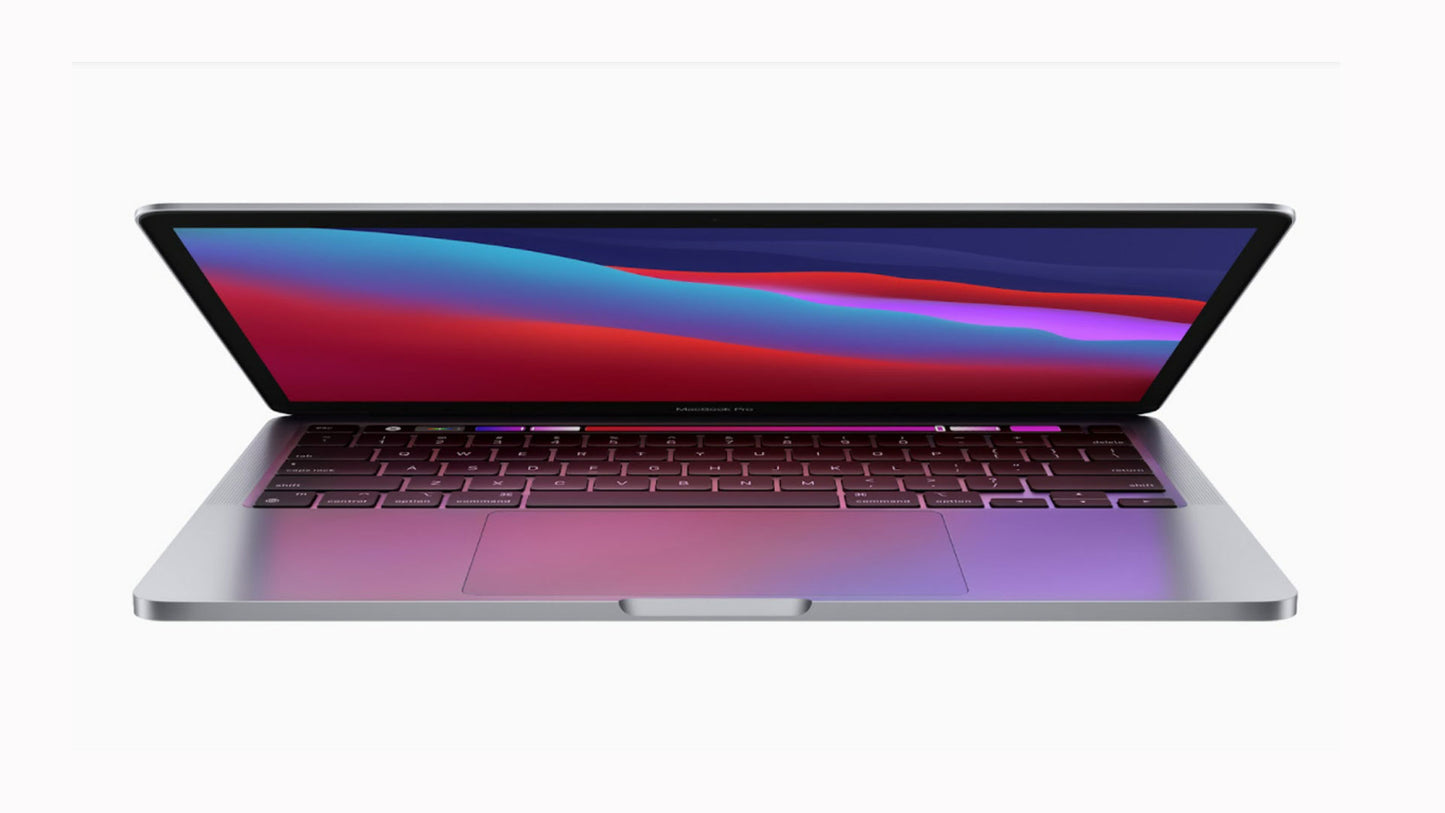
The M1 MacBook Pro is a 13.3-inch professional laptop powered by Apple's own M1 chip, featuring an 8-core CPU, 8-core GPU, and 16-core Neural Engine — all on a single chip. It delivers up to 17 hours of wireless web browsing and up to 20 hours of video playback on a single charge, a 2560 x 1600 Retina display, Wi-Fi 6, and up to 2TB of SSD storage. It is purpose-built for developers, creative professionals, and serious everyday users who need a fast, long-lasting, portable professional machine.

Detailed Technical Specifications
M1 MacBook Pro Processor Performance Specs
|
Specification |
Detail |
|
Chip |
Apple M1 |
|
CPU Cores |
8-core (4 performance + 4 efficiency cores) |
|
GPU Cores |
8-core |
|
Neural Engine |
16-core |
|
Architecture |
Apple Silicon (ARM-based) |
|
Unified Memory Architecture |
Yes — CPU, GPU, and Neural Engine share the same memory pool |
M1 MacBook Pro Memory & Storage Specs
|
Specification |
Base Option |
Maximum |
|
Unified Memory |
8GB |
16GB |
|
Memory Type |
Unified (shared by CPU and GPU) |
Unified |
|
Base Storage |
256GB SSD |
2TB SSD |
|
Configurable Storage |
512GB, 1TB, or 2TB SSD |
2TB SSD |
M1 MacBook Pro Display Specs
|
Specification |
Detail |
|
Display Size |
13.3-inch diagonal |
|
Display Type |
Retina LED-backlit IPS |
|
Native Resolution |
2560 x 1600 |
|
Pixel Density |
227 pixels per inch |
|
Brightness |
500 nits |
|
Color Gamut |
Wide color (P3) |
|
True Tone |
Yes |
|
Supported Scaled Resolutions |
1680x1050, 1440x900, 1024x640 |
M1 MacBook Pro Battery & Connectivity Specs
|
Specification |
Detail |
|
Battery Capacity |
58.2-watt-hour lithium-polymer |
|
Wireless Web Life |
Up to 17 hours |
|
Movie Playback Life |
Up to 20 hours |
|
Power Adapter |
61W USB-C |
|
Ports |
2x Thunderbolt / USB 4 |
|
Thunderbolt Speed |
Up to 40Gb/s |
|
USB 4 Speed |
Up to 40Gb/s |
|
USB 3.1 Gen 2 Speed |
Up to 10Gb/s |
|
Wi-Fi |
Wi-Fi 6 (802.11ax), backward compatible a/b/g/n/ac |
|
Bluetooth |
Bluetooth 5.0 |
|
Headphone Jack |
3.5mm |
M1 MacBook Pro Graphics Capabilities Specs
|
Specification |
Detail |
|
GPU |
Apple M1 8-core GPU (integrated in M1 chip) |
|
Memory |
Unified memory shared with CPU |
|
External Display Support |
Up to one display at 6K resolution at 60Hz |
|
Video Output |
Thunderbolt 3 / DisplayPort over USB-C |
|
Adapter Support |
VGA, HDMI, DVI, Thunderbolt 2 (via adapters, sold separately) |
|
Video Playback Formats |
HEVC, H.264, ProRes |
|
HDR Support |
Dolby Vision, HDR10, HLG |
M1 MacBook Pro Portability and Build Specs
|
Specification |
Detail |
|
Height |
0.61 inch (1.56 cm) |
|
Width |
11.97 inches (30.41 cm) |
|
Depth |
8.36 inches (21.24 cm) |
|
Weight |
3.0 pounds (1.4 kg) |
M1 MacBook Pro Build & Essentials Specs
|
Specification |
Detail |
|
Finish Options |
Silver, Space Gray |
|
Keyboard |
Backlit Magic Keyboard with Touch Bar and Touch ID |
|
Keys (US layout) |
65 keys with inverted-T arrow key arrangement |
|
Trackpad |
Force Touch trackpad with pressure sensing and Multi-Touch gestures |
|
Camera |
720p FaceTime HD |
|
Microphone |
Studio-quality three-mic array with directional beamforming |
|
Speakers |
Stereo with high dynamic range, wide stereo sound, Dolby Atmos |
|
Audio Formats |
AAC, MP3, Apple Lossless, FLAC, Dolby Digital, Dolby Atmos |
|
Operating System |
macOS (Apple Intelligence capable) |
|
Enclosure |
Recyclable low-carbon aluminum |
|
Certification |
ENERGY STAR |
M1 MacBook Pro Technical Specs Explained
The M1 Chip: One Chip That Does Everything, Brilliantly
Traditional laptops have a separate processor, graphics chip, and memory that communicate across the motherboard. The Apple M1 chip puts all of these — the 8-core CPU, the 8-core GPU, and the 16-core Neural Engine — onto a single piece of silicon with a unified memory pool. What this means for you is simple: tasks happen faster, the machine runs cooler, and the battery lasts dramatically longer. A developer at a co-working space in Westlands can run Xcode, a local server, and a browser with twenty tabs open and still have battery left at the end of a 10-hour workday.
17-Hour Battery Life: The Freedom to Work Without a Power Socket
Before the macbook pro m1 2020, professional-grade laptops routinely required a charger after 5 to 6 hours of real use. The M1 MacBook Pro changes this entirely, delivering up to 17 hours of wireless web browsing and up to 20 hours of video playback on a single charge of its 58.2Wh battery. For professionals in Nairobi who move between client sites, cafés, and offices — or who travel frequently — this battery life means one less thing to worry about. You charge it overnight, and it is ready for the entire day.
A Retina Display That Makes Everything Look Exceptional
The 2560 x 1600 Retina display at 227 pixels per inch is sharp enough that text, images, and video all look crisp and natural without any visible pixelation. At 500 nits of brightness, it remains usable in well-lit environments. True Tone technology continuously adjusts the white balance to match your surroundings, which makes colours look natural and reduces the visual fatigue that comes from staring at a screen that is too blue or too warm for the room you are in. For designers and photographers, the P3 wide colour gamut ensures what you see on screen accurately represents your work.
Wi-Fi 6: Faster, More Stable Wireless Networking
The m1 macbook pro 13" includes Wi-Fi 6 (802.11ax), the latest generation of wireless networking. Wi-Fi 6 is faster and more efficient than its predecessors, particularly in environments with many connected devices — like a busy Nairobi office, a university campus, or a co-working space. If your internet connection and router support Wi-Fi 6, you will experience noticeably faster downloads and more stable performance during video calls and large file transfers.
The Magic Keyboard and Force Touch Trackpad: Built for All-Day Use
The Backlit Magic Keyboard on the M1 MacBook Pro has a comfortable key travel that makes extended typing sessions — long reports, code sessions, client proposals — feel easy and consistent. Touch Bar provides dynamic controls that change based on the app you are using. Touch ID lets you log in and authenticate Apple Pay purchases with a single fingerprint touch. The Force Touch trackpad is the most precise and gesture-capable trackpad available on any laptop, enabling two-finger scrolling, three-finger drag, and a full range of macOS gestures that significantly reduce the need for a separate mouse.
Why the M1 MacBook Pro Is a Must-Have
1. A Battery Life That Redefines What Portable Actually Means Up to 17 hours of web browsing and 20 hours of movie playback is not a marginal improvement over previous MacBook Pros — it is nearly double what earlier models delivered. For Kenyan professionals who spend long days away from reliable power sources, travel frequently, or work in environments where power cuts are a reality, this battery life provides a level of independence that no previous generation of MacBook Pro could match. The M1 MacBook Pro does not just last longer — it frees you from infrastructure dependency.
2. The Fastest Chip in Its Class, Running Silently and Cool The Apple M1 chip delivers performance that competes with or surpasses far more expensive laptops, while producing so little heat that the machine runs silently under most workloads. Noise emission at idle and during web browsing is just 4 dB at the operator position — effectively inaudible. For professionals who work in quiet environments like law offices, libraries, or recording studios, or who simply want a machine that does not sound like it is struggling, this matters enormously.
3. A Compact, Premium Machine That Does Not Compromise on Power At 1.4kg and just 1.56cm thin, the M1 MacBook Pro is one of the lightest professional laptops available. Yet it packs an 8-core CPU, an 8-core GPU, and up to 16GB of unified memory — specifications that outperform many larger, heavier machines. For professionals who carry their laptop every day across Nairobi — from home to office to client meetings to evening events — this combination of portability and power is genuinely transformative.
Who Should Buy the M1 MacBook Pro
The Mobile Professional and Remote Worker
Kenyan professionals who work flexibly — moving between home offices, client locations, Nairobi CBD meeting rooms, and occasional travel — need a machine that is light enough to carry all day, powerful enough to handle any task, and reliable enough to work through a full day without needing a charge. The m1 macbook pro price in Kenya reflects a machine built precisely for this user. The 1.4kg weight, the 17-hour battery, and the instant wake-from-sleep performance make it the ideal companion for a professional life that does not stay in one place.
The Developer and Technical User
Software developers building web apps, mobile applications, or backend services benefit enormously from the M1 chip's multi-core CPU performance and unified memory architecture. Running multiple development environments, compilers, local servers, and browser tabs simultaneously is smooth and responsive. For developers building products for Kenya's growing digital economy — from M-Pesa integrations to Safaricom API implementations — the macbook pro m1 2020 provides the headroom to build fast and test thoroughly without machine limitations slowing down the process.
The Student and Creative at the Start of Their Career
University students at institutions like the University of Nairobi, USIU-Africa, or Daystar University who are studying design, computer science, media, or business need a machine that handles demanding coursework, creative projects, and everyday productivity without breaking under pressure. The m1 macbook pro 13" is compact enough to carry between lectures, powerful enough to run design software and development tools, and has the battery life to last through a full day of classes and study sessions without needing to find a socket.
Proven Performance, Premium Build: What Owning the M1 MacBook Pro Is Really Like
The macbook pro 2020 m1 holds up extraordinarily well in real-world daily use. The low-carbon aluminium enclosure is rigid, premium, and resistant to the flex and creaking that affects many plastic-chassis laptops. At just 3.0 pounds, it disappears into a bag and feels light on the shoulder all day.
What stands out most in practice is the silence. Operating at just 4 dB at the operator position during both idle and active web use, the M1 MacBook Pro is effectively inaudible in normal working conditions — a direct result of the M1 chip generating so little heat that the cooling system rarely needs to engage at all. This is a fundamental change from previous Intel-based MacBook Pros, which would spin up fans noticeably under moderate loads.
The unified memory architecture means the GPU and CPU share the same fast memory pool, eliminating the bottleneck that occurs when data has to be copied between separate memory banks on traditional laptops. For users who work with large image files, video timelines, or data-intensive spreadsheets, this translates into faster response times and smoother multitasking. Apple Intelligence capability is built in, making this machine forward-compatible with Apple's growing suite of on-device AI features as macOS continues to evolve.
The macOS ecosystem also adds long-term value. Built-in apps including GarageBand, iMovie, Pages, Numbers, and Keynote cover a broad range of creative and professional needs without additional software costs. Regular macOS updates continue to improve performance and add features, meaning the machine you buy today becomes meaningfully better over time through software.
M1 MacBook Pro Frequently Asked Questions
Is the M1 MacBook Pro Still Worth Buying?
Yes, for the vast majority of professional and creative use cases, the M1 MacBook Pro remains an excellent machine. The Apple M1 chip delivers performance that handles demanding tasks including video editing, software development, graphic design, and multitasking with ease. The 17-hour battery life and silent operation are difficult to match at any price point. For users who do not require the additional power of later Apple Silicon chips, the m1 macbook pro price makes it one of the most compelling value propositions in the professional laptop category.
What Is Unified Memory and Why Does It Matter?
Unified memory means that the M1 chip's CPU, GPU, and Neural Engine all draw from a single shared memory pool rather than having separate, isolated banks of RAM and VRAM. The practical benefit is that data does not have to be copied between different memory chips when the GPU needs to use information the CPU was processing — it is simply already there, in shared high-bandwidth memory. This makes tasks that involve both heavy CPU and GPU work — such as video editing, image processing, and 3D rendering — faster and more efficient than on laptops with traditional separate memory architectures. When choosing between 8GB and 16GB, opt for 16GB if you regularly work with large files, multiple virtual machines, or plan to use the machine for three or more years.
How Does the M1 MacBook Pro Handle External Displays?
The M1 MacBook Pro supports one external display at up to 6K resolution at 60Hz via Thunderbolt 3. This covers the vast majority of professional monitor setups, including 4K and 5K displays. Native DisplayPort output is available over USB-C, and VGA, HDMI, DVI, and Thunderbolt 2 connections are supported via adapters, sold separately. It is important to note that the M1 chip supports only one external display simultaneously — users who require two or more external monitors alongside the built-in screen will need to consider a different configuration.
What Is the M1 MacBook Pro Battery Life Like in Real-World Use?
Apple tested the macbook pro m1 2020 at up to 17 hours of wireless web browsing and up to 20 hours of Apple TV app movie playback using preproduction systems with 8GB RAM and 512GB SSD. In real-world mixed use — combining browser sessions, document editing, video calls, and light creative work — most users consistently achieve 12 to 15 hours of productive use. This is a significant real-world improvement over previous MacBook Pro generations. Heavier tasks like sustained video rendering will reduce battery life, but even under moderate sustained loads the M1 MacBook Pro outlasts most competing professional laptops.
What Is Included in the Box and What Else Will I Need?
Every M1 MacBook Pro ships with the 13-inch MacBook Pro itself, a 61W USB-C Power Adapter, and a 2-metre USB-C Charge Cable. The machine has two Thunderbolt / USB 4 ports, so if you need to connect USB-A devices, an SD card reader, or an HDMI monitor directly, you will need a USB-C hub or individual adapters, which are sold separately. For users who need more than one external display, a Thunderbolt dock with DisplayLink support is the recommended solution. The 3.5mm headphone jack is built in, so wired headphones and audio interfaces connect directly without any adapter required.